Most product teams run into the same issue: users sign up, click around a bit, and leave before they ever reach the feature that would make them stay. Documentation exists, but nobody reads it. Live demos work, but they don't scale. Most teams end up trying to solve this with more documentation, but the real issue is how the product is explained.
Product walkthrough software helps solve this by turning complex workflows into guided experiences that users actually follow. This guide covers 12 tools across in-app tours, video guides, and interactive demos. It breaks down what each one is best and how to choose the right one for your team.
What is product walkthrough software
Product walkthrough software helps users learn how to use a product through guided, step-by-step instructions instead of figuring things out on their own. You'll find two main types: in-app tours that appear as overlays inside your live product, and video walkthrough tools. These create standalone guides you can share anywhere.
In-app product tours guide users through actions in real time, directly inside the interface. Video walkthrough tools capture workflows and turn them into narrated, step-by-step guides. These can be embedded in help centers, shared via link, or exported as video files.
Most product walkthrough tools handle three core functions:
- Capture: Record clicks, screens, or actions within a product
- Generate: Automatically create step-by-step instructions or narrated videos
- Deliver: Embed guides in help centers, knowledge bases, or directly in-app
The right choice depends on whether you're building onboarding flows inside your product or creating shareable content for support, training, or documentation.
Quick comparison of product walkthrough tools (by use case)
Here's a quick breakdown of how these tools differ based on what you actually need them for.
| Tool | Best use case | Output | Free / Trial |
|---|---|---|---|
| Guideless | Support, onboarding and training guides | Video guides | Yes |
| Appcues | In-app onboarding | In-app tours | No |
| UserGuiding | No-code onboarding for small teams | In-app tours | Yes |
| Userpilot | Product adoption and onboarding | In-app tours | No |
| Chameleon | Custom in-app onboarding | In-app tours | No |
| Pendo | Product analytics and onboarding | In-app tours | Yes |
| Navattic | Sales and marketing demos | Interactive demos | Yes |
| Loom | Async video walkthroughs | Video | Yes |
| Whatfix | Enterprise employee onboarding | In-app tours | No |
| WalkMe | Large-scale internal training | In-app tours | No |
| Arcade | Interactive marketing demos | Interactive demos | Yes |
| Hopscotch | Lightweight onboarding for startups | In-app tours | Yes |
One thing most teams underestimate is how quickly walkthrough content becomes outdated. If your product changes often, tools that require constant re-recording or rebuilding flows can quickly become a bottleneck.
12 product walkthrough software tools
Guideless
Guideless converts click-through workflows into narrated video guides using AI. You capture a process once, and the system generates a structured guide with voiceover, captions, and visual highlights.
Unlike in-app tour tools, Guideless focuses on creating shareable walkthrough content for onboarding, support documentation, and internal training. There's no recording setup involved. You click through the workflow you want to document, and the tool handles the rest.
Guides can be embedded in Notion, Confluence, or help centers, or exported as MP4 files.
Guideless focuses on video-based guides rather than in-app overlays, which makes it a better fit for support, documentation, and async onboarding.
Try creating your first walkthrough in minutes
Appcues
Appcues is an in-app product tour platform built for SaaS onboarding. The no-code builder lets product teams create interactive tours, tooltips, and checklists directly inside web applications.
Tours appear as overlays on top of your actual UI, which works well for guiding users through specific actions in real time. The trade-off is that it requires integration with your product, and tours only work inside the product itself.
UserGuiding
UserGuiding offers no-code guided tour software focused on user onboarding. The platform includes checklists, tooltips, and resource centers alongside the core tour functionality.
Setup is relatively quick compared to more complex, enterprise tools. The customization options are more limited than higher-end tools, which is the expected trade-off at this price point.
Userpilot
Userpilot combines in-app tours with product analytics. This lets you track feature adoption alongside your onboarding flows, so you can see how they impact engagement.
Like other in-app tools, Userpilot requires integration with your product and focuses on web applications.
Chameleon
Chameleon is an in-app tour builder with deeper customization options than many alternatives. You can create branded, interactive product tours with advanced targeting based on user segments and behavior.
The flexibility comes with added complexity. There's more to configure, which means a steeper learning curve.
Pendo
Pendo is primarily a product analytics platform, but it includes built-in guided tours as part of its feature set. This combination works well for enterprise teams that want to connect usage data with in-app guidance.
The analytics capabilities are strong, though the tour functionality is more of an add-on than a core focus. Pricing is typically higher than standalone tour tools.
Navattic
Navattic creates interactive demos for sales and marketing rather than live product onboarding. You build clickable product demos that can be embedded on your website or shared with prospects.
This approach works well for lead generation and sales enablement. It's less suited for ongoing user education or support documentation.
Loom
Loom is a screen recording tool for asynchronous video communication. You record your screen and camera to create quick walkthroughs, then share them via link.
The tool is fast and familiar to many teams. However, creating polished output requires manual recording and editing. There's no automatic structuring or narration, and videos tend to be longer and harder to scan than step-by-step guides.
Whatfix
Whatfix is a digital adoption platform designed for enterprise applications like Salesforce, Workday, and ServiceNow. It provides in-app guidance to help employees navigate complex internal tools.
It handles large-scale deployments across multiple enterprise systems.
WalkMe
WalkMe is another enterprise digital adoption platform used for large-scale employee training across multiple systems. It offers extensive customization and integration capabilities.
Implementation requires significant time and resources. Pricing is typically higher than mid-market alternatives.
Arcade
Arcade creates screenshot-based interactive demos for marketing purposes. You capture screenshots and turn them into clickable product tours that can be embedded on websites.
The screenshot-based format means you don't need access to a live product. However, demos can become outdated when the UI changes.
Hopscotch
Hopscotch is a lightweight in-app tour tool designed for SaaS startups. It offers simpler onboarding tours without the complexity or pricing of enterprise platforms.
Feature depth is more limited than larger platforms, which is expected for early-stage companies.
Common use cases for product tour software
Onboarding new users
Guided product tours show new users key workflows immediately after signup. Instead of reading documentation or waiting for a call, users see exactly what to do in context.
This approach can replace or supplement live onboarding calls. The time cost of live calls grows with each new user, while self-serve guides scale without additional effort. Companies that invest in structured onboarding often see higher activation and retention rates.
Driving feature adoption
Teams use interactive product tours to highlight new features or underused functionality. Intercom reports that in-app tours drive 7x more engagement than email. When users encounter a feature for the first time, a brief tour helps explain what it does and why it matters.
The key is timing. Tours work best when they appear at the right moment rather than overwhelming users upfront.
Reducing support tickets
Walkthrough content answers common questions before users contact support. When the same question comes up repeatedly, a reusable guide scales better than individual responses.
Video guides work particularly well here because they show exactly what to do instead of just describing it. Teams can embed guides in help centers or link to them directly in support conversations. See real guide examples in the Guideless gallery.
Internal training and SOP documentation
Product walkthrough software isn't just for customers. Effective onboarding improves employee retention by 82%, making visual guides useful for documenting standard operating procedures and training on internal tools. Learn more in our guide on AI process documentation for teams.
Employees learning tools like Salesforce or Workday benefit from visual guides just as much as customers learning your product.
Most teams don't need more tools - they need a better way to explain their product.
Key features to look for in guided tour software
No-code editor
A no-code editor lets product managers, customer success teams, and support staff create guides without developer involvement. When guides require engineering resources to create or update, they tend to fall out of date.
Tools that empower non-technical teams to own the content are more likely to stay up to date, which is critical for effective onboarding.
Analytics and engagement tracking
Look for analytics that track views, completion rates, and where users drop off. Drop-off data is especially useful. If users consistently stop at a specific step, that step might be confusing or unnecessary.
Without analytics, you're mostly guessing about how effective your guides actually are. Product analytics helps teams understand how users move through onboarding and where they drop off.
Customization and branding
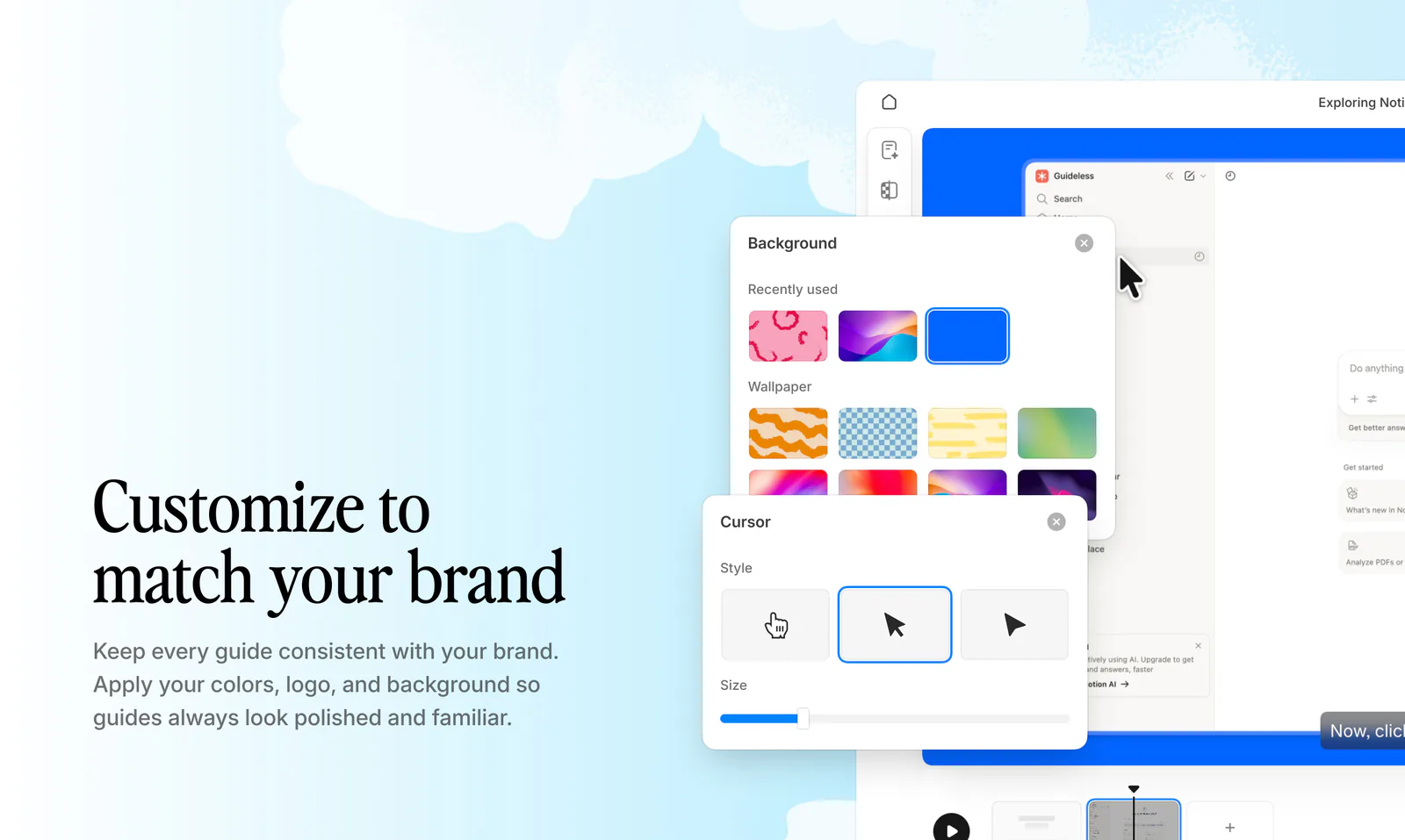
Consider customization options like logo placement, colors, fonts, and backgrounds. Branding consistency matters for customer-facing guides because it affects how professional and trustworthy the content feels.
Integrations with distribution
Think about where your guides will live and how users will access them. Many teams rely on help centers and knowledge bases to make onboarding content accessible at the right moment.
- Embedding: Can guides be embedded in tools like Notion, Confluence, Zendesk, or Intercom?
- Sharing: Can you share guides via direct links or export them as video files?
- Triggering: Can guides appear in-app based on specific user actions?
Multi-language support
Multi-language support matters for companies with international users or multilingual support teams. Some tools offer AI voiceover and translation, while others require you to create separate guides for each language. Tools like Guideless make this easier by automatically generating guides with AI voiceover in multiple languages.
Product tours vs video walkthroughs
Interactive product tours are overlays inside the live product that guide users through actions in real time. They require integration with your product and work best for in-app onboarding where you want users to take action immediately.
Video walkthrough tools create standalone guides with narration that you can share anywhere. They're easier to create and maintain when product UIs change frequently, and they work well for help centers, async onboarding, and support documentation.
In practice, many teams end up using both, depending on whether they want to guide actions inside the product or create reusable content outside of it. Maintenance is also an important factor to consider. In-app tours often break when your UI changes, which means ongoing updates.
Video guides can be updated independently, and some tools allow step-level edits without re-recording the entire workflow. For a direct comparison, see how Guideless compares to Loom for video walkthroughs.
If your goal is to create scalable, shareable guides without relying on engineering, video-based tools like Guideless are often are better choice.
How to choose the right tool
Start by defining your primary use case. Are you building customer onboarding flows, internal training content, or support documentation? Different tools excel at different use cases.
Next, think about the output format. In-app tours work well for guiding users through actions in real time, while video guides are better for help centers, async onboarding, and shareable content.
Consider your technical requirements. Some tools require integration with your product, while others work independently.
Also think about who will create and maintain the content. If it's non-technical team members, a no-code editor becomes important.
Finally, think about maintenance. How often does your product UI change? Tools that make updates easy will save you time over the long term. For example, tools like Guideless make it easier to update guides without re-recording entire workflows. Product teams that focus on onboarding and usability tend to see better long-term retention.
How long does it take to create a product walkthrough?
With traditional screen recording, creating a polished walkthrough can take hours. This includes scripting, recording, and editing.
61% of companies cite time and bandwidth as their biggest video production hurdles. AI-powered tools reduce this to minutes by automating narration and formatting. Video content is also becoming a key part of how users learn and engage with products.
Turn workflows into scalable product guides with Guideless
Guideless is built for teams that want to create video walkthrough guides quickly without manual recording or editing. You capture a workflow once, and the system generates a narrated guide with captions, visual highlights, and AI voiceover in 50+ languages.
Guides can be shared via link, embedded in help centers and documentation tools, or exported as video files. Built-in analytics show views, completion rates, and where users drop off.