Customer Onboarding Software: Tools, Examples & Best Platforms (2026)

Customer onboarding software helps teams get new users from signup to value faster. In practice, it’s what turns “I’ll check this later” into real product adoption.
But as SaaS teams grow, onboarding quickly stops scaling. Live walkthroughs take too much time, documentation gets ignored, and knowledge ends up scattered across tools.
The result? Users drop off before the product ever clicks.
Most onboarding tools try to fix this - but still rely on manual setup, constant updates, and ongoing effort to maintain.
That’s why many teams are shifting toward a different approach: instead of building onboarding step by step, they capture workflows once and turn them into reusable, scalable guides.
Tools like Guideless make this possible by automatically generating structured, AI-narrated video guides from real workflows.
In this guide, we’ll break down how customer onboarding software works, what features matter, and which tools are best in 2026.
What is customer onboarding software (and how it works)
Customer onboarding software helps teams guide new users from signup to real product usage. The goal is simple: shorten time-to-value and make sure users actually understand how to use the product.
Instead of relying on live demos or static documentation, onboarding software structures the learning experience - showing users what to do, when to do it, and how to get there faster.
Most tools in this category fall into three main approaches:
- In-app guidance platforms. These tools guide users directly inside the product using tours, checklists, and contextual prompts. They work well for simple, self-serve onboarding where users learn by doing.
- Client onboarding portals. These are shared workspaces where teams manage onboarding as a project - with timelines, tasks, and resources. They’re typically used in enterprise or high-touch onboarding processes.
- Workflow documentation tools. These tools turn real workflows into step-by-step guides or video walkthroughs. Instead of guiding users live or inside the product, they create reusable content that users can follow anytime.
Each approach fits a different onboarding model.
Self-serve SaaS products often rely on in-app guidance, while complex implementations typically require onboarding portals and coordination.
But as teams grow, both approaches start to hit limits - in-app flows require constant maintenance, and portals don’t scale well without ongoing manual effort.
That’s where workflow-based onboarding stands out. Instead of guiding every user individually, teams create onboarding content once and reuse it across onboarding, support, and training.
Why customer onboarding software is critical for growing SaaS teams
Manual onboarding does not scale with customer volume
Live walkthroughs don’t scale.
Every new customer means another call, another demo, another hour blocked on someone’s calendar. As your customer base grows, the time required increases linearly, but your team capacity doesn’t.
You can’t add headcount at the same pace you add customers.
So something has to give.
Either onboarding quality drops, or your team burns out trying to keep up.
Documentation and help articles go unconsumed
Written documentation doesn’t get used the way teams expect.
It’s hard to follow, easy to ignore, and quickly becomes outdated as the product evolves. Most users won’t read long instructions - especially when they’re just trying to complete a specific task in the moment.
So instead of helping, documentation gets skipped entirely.
The result is predictable: users get stuck and still ask for help.
Your support queue fills with questions that technically already have answers somewhere in your help center - but not in a format or moment that actually helps users move forward.
Live walkthroughs create bottlenecks for customer success teams
Customer success teams end up repeating the same explanations over and over again.
Every new customer needs the same walkthrough, the same demo, the same answers - just on a different call. This creates constant scheduling pressure and quickly becomes a bottleneck as the customer base grows.
Instead of focusing on strategic work like expansion, onboarding optimization, or churn prevention, your team is stuck delivering the same onboarding manually.
And that has a real cost.
When your best people spend their time on repetitive education, you lose the opportunity to build deeper, higher-value customer relationships.
Knowledge fragments across tools and systems
Onboarding content quickly becomes scattered.
Some guides live in Notion, others in Confluence. Videos sit in Loom, answers hide in help centers, and important context gets buried in email threads. There’s no single place that clearly shows how to complete a specific workflow.
Over time, this only gets worse.
Content becomes outdated, links break, and even internal teams struggle to find the right resources - let alone customers.
Instead of enabling onboarding, your system creates confusion.
Key Features to Look for in Customer Onboarding Software
Self-serve onboarding resources
Self-serve onboarding means customers can find answers and complete tasks without needing to schedule a call or wait for support.
This includes things like embedded guides, help centers, and on-demand resources that are available exactly when users need them.
The key is accessibility.
The fewer steps it takes to find the right answer, the faster users can move forward - without breaking their flow or relying on your team.
Structured workflow guides and video walkthroughs
Generic screen recordings often lack structure and clarity how-to videos see 74% engagement versus 43% for general videos of the same length. Structured guides show step-by-step actions with clear visual highlights, making it obvious what to click and when.
Video walkthroughs match how people actually learn software. 74% of people have watched a video to learn a new app or website, and seeing the exact workflow in context reduces confusion compared to reading text descriptions.
Why traditional onboarding content doesn’t scale
Most onboarding content today is either manual or static. In-app flows require constant maintenance, documentation quickly becomes outdated, and recording videos takes time to create and even more time to update.
This creates a familiar bottleneck: teams know onboarding needs improvement, but building and maintaining content becomes a project of its own.
As a result, onboarding either doesn’t get updated - or never gets built properly in the first place.
This is where AI-powered onboarding tools change the equation.
AI-powered content creation and narration
AI significantly reduces the effort required to create onboarding content. Instead of manually writing scripts, recording voiceovers, and editing videos, teams can generate structured guides automatically.
Capabilities typically include script generation, voiceover in multiple languages, and step-level narration that adapts to the workflow.
Here’s how it looks in practice:
Tools like Guideless take this a step further by capturing a workflow once and turning it into a complete video guide with captions and narration in minutes. This removes the need for traditional recording and editing, making onboarding content much faster to produce and easier to keep up to date.
Create your first onboarding guide in minutes.
Personalization and branding options
As onboarding becomes more scalable, consistency becomes just as important.
Custom logos, colors, and backgrounds help create a cohesive brand experience across all onboarding content. Since onboarding is often the first meaningful interaction customers have with your product, consistent presentation signals professionalism and builds trust early on.
Instead of sending generic-looking guides or videos, teams can deliver onboarding that feels like a natural extension of their product and brand.
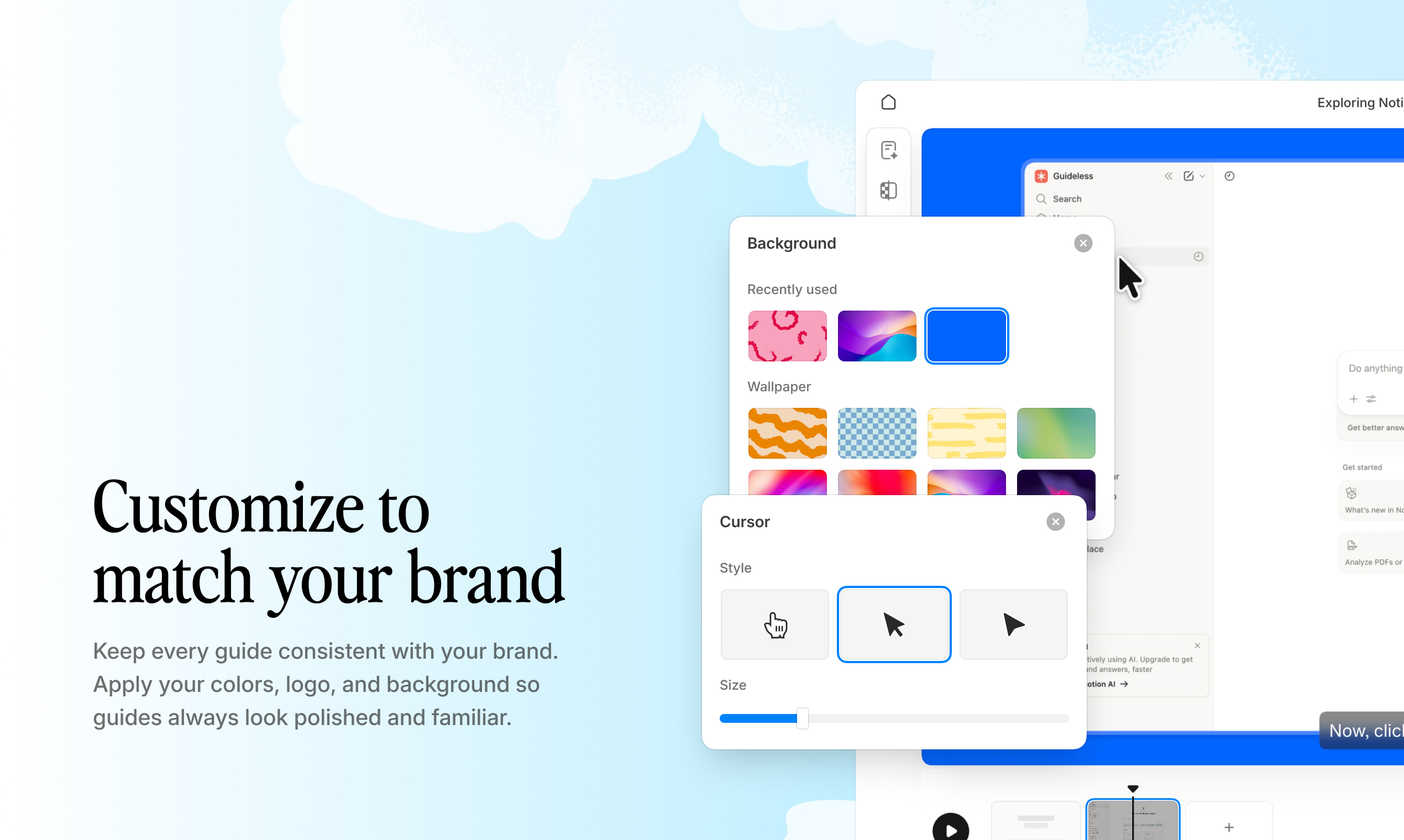
Example: A branded onboarding guide with custom colors, backgrounds, and UI styling that matches your product experience with Guideless
Embedding into onboarding portals and help centers
How easily customers can access your onboarding content depends on where it lives.
If guides are buried in separate tools or require users to switch context, they’re far less likely to be used. That’s why integrations with platforms like Notion, Confluence, and in-product surfaces matter.
The best onboarding content lives where customers already work - whether that’s inside your product, a help center, or a shared onboarding space. Simple sharing options like links, embeds, and exports make it easier to place content exactly where it’s needed, without adding friction.
Built-in engagement analytics
Creating onboarding content is only part of the process - understanding how it performs is what makes it effective.
Metrics like view counts, completion rates, and drop-off points show where users engage and where they lose momentum. Without this visibility, teams are forced to guess what’s working.
With it, onboarding becomes something you can continuously improve based on real user behavior, not assumptions.
Types of customer onboarding software
Customer onboarding software isn’t one single type of tool - it covers several different approaches, depending on how your onboarding is structured.
Some tools guide users inside the product, others manage onboarding as a process, and some focus on creating scalable onboarding content that works consistently as you grow.
| Category | Best for | Key capabilities |
|---|---|---|
| In-app guidance platforms | Self-serve SaaS products | Product tours, checklists, in-app tooltips |
| Client onboarding portals | High-touch onboarding and enterprise implementations | Project timelines, task management, document sharing |
| Workflow documentation tools | Scalable onboarding and customer education | Video guides, step-by-step walkthroughs, reusable content |
| Email automation tools | Behavior-based onboarding sequences | Drip campaigns triggered by user actions |
Each category solves a different part of the onboarding problem.
In-app tools help guide users in the moment, portals manage onboarding as a process, and email sequences support ongoing engagement. But as teams grow, many start prioritizing solutions that create reusable onboarding content - because it scales across onboarding, support, and training without increasing manual work.
Best Customer Onboarding Software in 2026 (Compared)
There’s no single “best” customer onboarding software - the right choice depends on how your onboarding is structured and how much manual work you want to eliminate as you scale.
Instead of one category, most teams combine different tools depending on their needs. Below are some of the most widely used onboarding platforms, grouped by approach and use case.
Below is a comparison of the most widely used customer onboarding tools, based on use case, scalability, and level of automation.
Best for in-app onboarding software: Appcues, UserGuiding, Userpilot
In-app guidance tools deliver onboarding directly inside the product using tooltips, checklists, and contextual prompts.
They work well for self-serve products where users learn by doing and need guidance in the moment. However, they require ongoing maintenance - as your product UI changes, flows need constant updates to stay accurate.
Best for high-touch onboarding: Notion, ClickUp, onboarding portals
Client onboarding portals and project management tools are used for more complex implementations with multiple stakeholders.
They help structure onboarding as a process, with timelines, tasks, and shared resources. This approach works well in enterprise environments, but it relies heavily on manual coordination and doesn’t scale easily without additional effort.
Best for scalable onboarding content: Guideless
Workflow-based onboarding tools take a different approach.
Instead of guiding users live or inside the product, they focus on creating reusable onboarding content that can be shared across onboarding, support, and training.
Tools like Guideless allow teams to capture a workflow once and automatically turn it into a structured, narrated video guide. This eliminates the need for manual recording and editing, while making onboarding content much faster to create and easier to maintain.
As a result, onboarding becomes something you can scale without increasing headcount or repeating the same work for every customer.
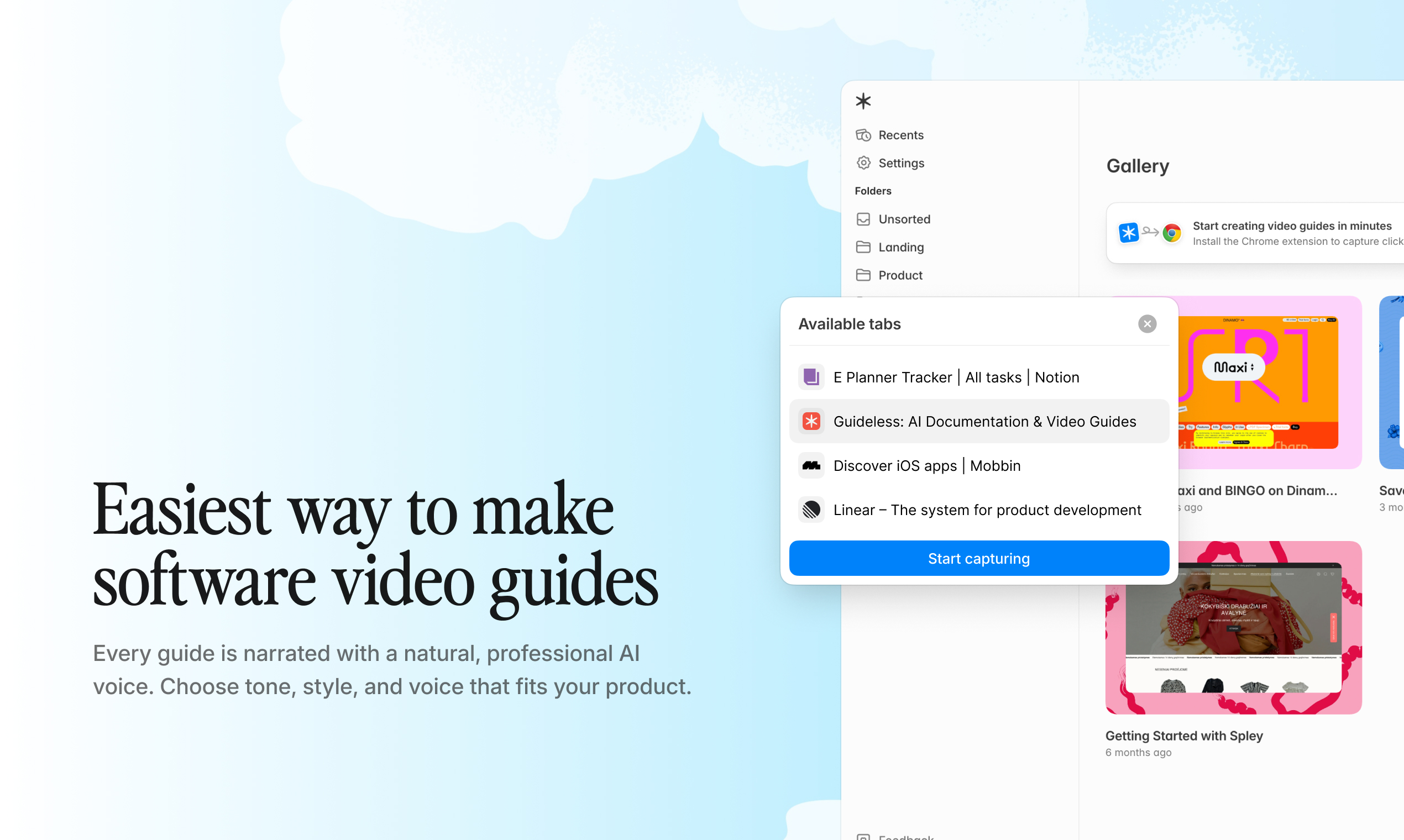
Create your first onboarding guide in minutes with Guideless
Free and low-cost onboarding tools to get started
Many onboarding tools offer free plans or entry-level options, which makes them useful for early-stage teams testing different approaches.
- Guideless – create AI-generated video onboarding guides (free to start)
- Loom – simple video walkthroughs (free plan available)
- Notion + Loom – lightweight DIY onboarding setup
- UserGuiding – lower-cost in-app onboarding tool
- HubSpot – email onboarding and automation
These tools are a good starting point, but they often require manual setup and don’t scale well as your product and customer base grow.
Email and automation platforms for onboarding
Email automation supports onboarding outside the product by reinforcing key actions and bringing users back when they drop off.
Triggered emails based on user behavior can remind users to complete important steps, highlight features they haven’t tried yet, or guide them back into the product at the right moment.
However, email works best as part of a broader onboarding system rather than as a standalone solution. It can nudge users forward, but it can’t fully replace in-product guidance or clear, structured onboarding content.
How customer onboarding software reduces time to value
Customer onboarding software reduces time to value by making it easier for users to understand, adopt, and apply your product without friction.
Customers learn faster with visual step-by-step guides
Visual onboarding matches how people naturally learn. Instead of reading instructions and translating them into actions, users can see exactly what to do in context and follow along.
This removes guesswork and helps users complete tasks faster, especially when they’re unfamiliar with the product.
Teams spend less time repeating the same explanations
Scalable onboarding content replaces repetitive live calls. Instead of explaining the same workflows to every customer, teams can create guides once and use them across onboarding, support, and training.
This frees up customer success teams to focus on higher-value work, while still delivering consistent onboarding at scale.
Onboarding content updates as products change
Good onboarding software makes it easy to keep content up to date. When features evolve, guides can be updated quickly instead of becoming outdated and misleading.
This prevents knowledge decay - where old content no longer reflects how the product actually works - and ensures customers always learn from accurate, relevant guidance.
How to replace live calls with scalable async onboarding
Capture a workflow once and reuse it across every customer
The capture-once model fundamentally changes how onboarding works.
Instead of repeating the same walkthrough for every new customer, teams can record a real workflow once, generate a structured guide, and reuse it across onboarding, support, and training. This removes the need for repeated calls and ensures every customer gets the same high-quality experience.
The impact is simple: no scheduling, no duplication, and no trade-off between scale and quality.
Support multiple languages with AI voiceover
AI-powered narration makes it possible to localize onboarding without re-recording content.
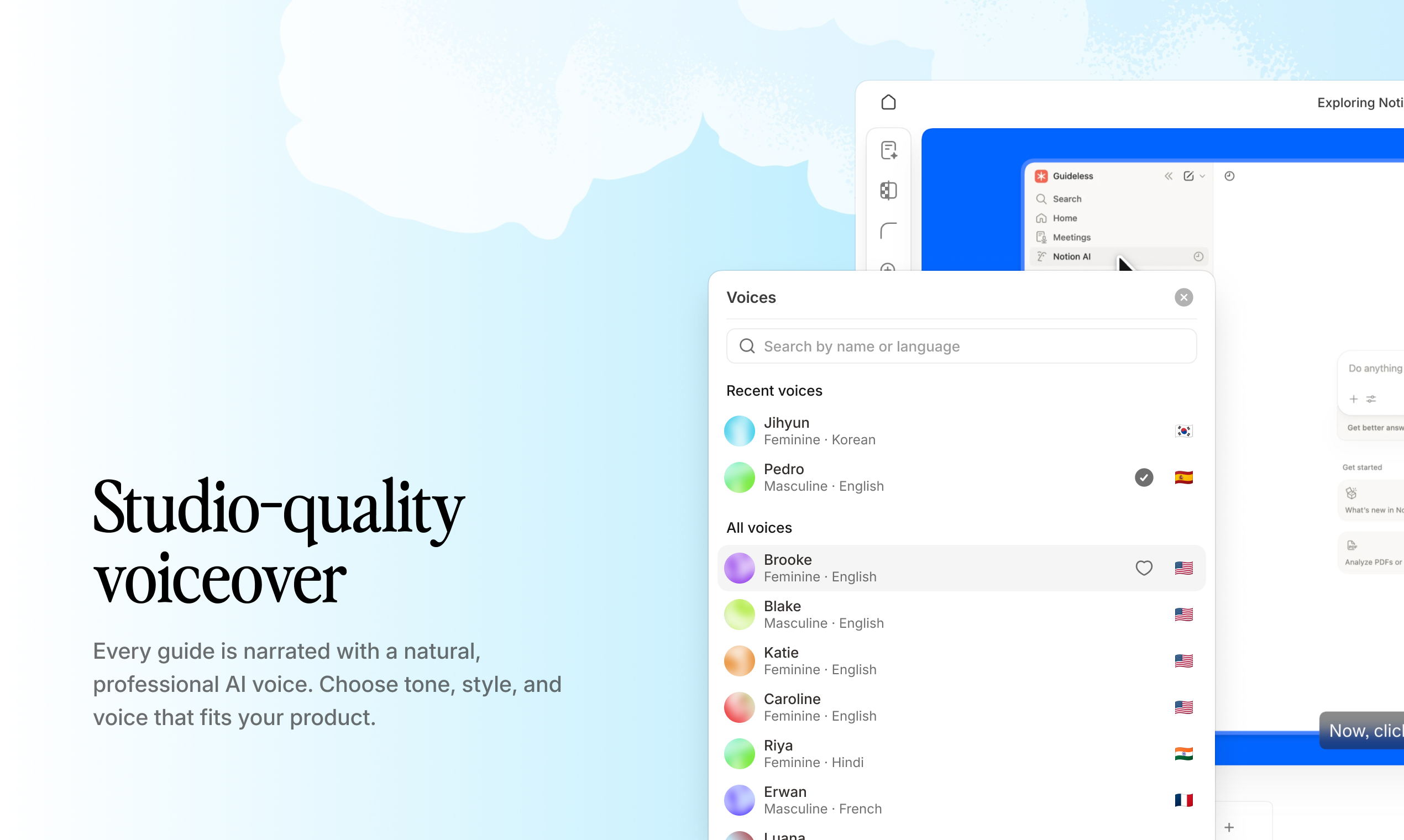
A single workflow can be turned into guides in multiple languages, allowing teams to support international customers without additional effort. This removes a major barrier to scaling onboarding globally.
Embed guides into product experiences and client portals
Even the best onboarding content only works if users can easily access it.
Flexible distribution options - like sharing via link, embedding in Notion or Confluence, or integrating into help centers - ensure guides appear exactly where customers already work. This reduces friction and makes it far more likely that onboarding content actually gets used.
How to track onboarding progress and customer engagement
Tracking onboarding performance turns it from a one-time setup into a system you can continuously improve.
View and completion metrics for each guide
Metrics like views, watch time, and completion rates show how customers actually interact with your onboarding content. When a guide gets a lot of views but low completion, it’s a clear signal that something isn’t working - either the content is too long, unclear, or not relevant to the user’s goal.
Drop-off analysis to identify friction points
Drop-off data helps pinpoint exactly where users lose momentum.
If most viewers stop at a specific step, that’s where friction exists. Instead of reworking entire guides, teams can focus on improving the exact moments that cause confusion, making optimization faster and more targeted.
Engagement data to inform customer success actions
Engagement data also becomes a powerful input for customer success teams.
Low engagement can signal risk early, allowing teams to step in before customers churn. High engagement, on the other hand, often indicates readiness for the next step - whether that’s deeper feature adoption, expansion, or upsell conversations.
Who benefits from a customer onboarding solution
Customer onboarding software isn’t just for one team - it impacts every function responsible for customer experience and growth.
Customer success and onboarding teams
Customer success teams are usually the primary users. Their goal is to onboard customers faster without increasing headcount.
Instead of relying on live calls, they can deliver consistent onboarding through reusable content and use engagement data to focus their time where it matters most.
Product managers and product marketing teams
Product and marketing teams use onboarding tools to explain features more clearly and drive adoption.
Rather than coordinating demos or creating one-off materials, they can launch onboarding content alongside new features and ensure users understand how to get value from them.
Support and help center teams
Support teams benefit by reducing repetitive questions.
Turning common support queries into structured guides helps deflect tickets, improve response times, and give customers faster access to answers without waiting for assistance.
SaaS founders scaling customer education
For founders, onboarding becomes part of the company’s infrastructure.
When customer growth outpaces team growth, scalable onboarding is no longer optional. It’s what allows the business to deliver a consistent experience without constantly adding headcount.
How to evaluate customer onboarding software for your team
Choosing the right onboarding tool comes down to one question: can your team actually use it consistently as you grow?
Content creation speed and ease
If creating onboarding content takes too long, it simply won’t get done. Look for tools that don’t require technical skills or manual setup - speed and simplicity are critical for adoption.
Integration and distribution flexibility
Onboarding only works if users can access it easily. The best tools let you embed or share content across your product, help center, and onboarding portals without friction.
Analytics and performance visibility
Without data, onboarding becomes guesswork. Engagement metrics like views, completion rates, and drop-offs help you understand what’s working - and what needs improvement.
Maintenance and long-term scalability
Onboarding content quickly becomes outdated if it’s hard to update. Choose tools that make it easy to keep guides accurate as your product evolves, without turning maintenance into a full-time job.
Build a scalable onboarding system with video guides
Documentation and live calls don’t scale. As your customer base grows, onboarding needs to work without requiring more of your team’s time.
Structured video guides solve this by capturing workflows once and making them available to every customer. Instead of repeating the same explanations, teams can deliver consistent onboarding through reusable content.
With tools like Guideless, you can record a workflow once and turn it into a narrated, branded video guide in minutes - without manual editing or setup.
If your team is still relying on onboarding calls or static documentation, it may be time to move to a more scalable approach.
Create your first onboarding guide in minutes with Guideless.
Customer onboarding software FAQs (what teams need to know)
What is customer onboarding software and how is it different from project management tools?
Customer onboarding software focuses on helping users learn how to use a product. Project management tools, on the other hand, are designed to track tasks, timelines, and coordination.
While some platforms overlap, onboarding tools are built around education and adoption - not just execution.
How often should customer onboarding content be updated?
Onboarding content should be updated whenever your product or workflows change.
If guides fall out of date, they don’t just lose value - they can actively confuse users. Keeping content accurate is essential to maintaining a reliable onboarding experience.
Can customer onboarding tools support multiple languages for global teams?
Many onboarding platforms support multiple languages through AI-powered voiceover or translation.
This allows teams to localize onboarding without re-recording content for each language, making it much easier to scale across international markets.
How do SaaS teams measure the ROI of customer onboarding software?
ROI is usually measured through a combination of faster time-to-value, fewer support tickets, reduced time spent on onboarding calls, and improved retention.
One of the clearest signals is support deflection - when users stop asking questions that are already covered in onboarding content.
What content format works best for customer onboarding?
Visual, step-by-step guides and short video walkthroughs tend to perform best.
They show users exactly what to do in context, which is much easier to follow than reading instructions and translating them into actions.
Do customers need to create an account to access onboarding guides?
Most modern onboarding tools allow guides to be shared via link, without requiring account creation.
This removes friction and makes it more likely that users will actually engage with the content when they need it.