Replace Static Documentation with Interactive Training | 2026 Guide

Many organizations now want to move away from static documentation for software training. When improving user onboarding, it’s important to understand why people often skim help articles, skip long PDFs, or ignore wiki pages. Static formats usually require too much effort to implement.
Interactive training replaces passive reading with real-time visual guidance. Rather than just describing steps, it shows users exactly what to do. Onboarding managers should review their current training materials to see which ones would be most effective as interactive guides. Focus on processes or workflows that would benefit from step-by-step video instructions, and try starting with a small pilot team. This guide covers why static documentation doesn’t work as well, how interactive training helps, and how to make the switch step by step.
Why static documentation fails (and what to use instead)
Static documentation refers to fixed content such as PDFs, wiki pages, and help articles that explain how software works. The challenge is that software often changes faster than teams can update these materials, and most users don’t read long documents. This creates a gap between what the documentation says and what users actually see on their screens.
Users don’t read long documentation
Most people avoid long, text-heavy instructions. Even when they do read them, 79% just scan for keywords instead of reading every word or carefully following each step.
This issue is about how people learn best. With static documentation, users have to read a step, switch to the software, find the right button, complete the action, and then return to the document. This constant switching slows them down and causes more mistakes.
Video-based training, by contrast, shows the workflow in real time so users can watch and follow along.
Documentation becomes outdated quickly
Knowledge decay occurs when documentation no longer aligns with the software. In fast-moving SaaS companies, this mismatch can appear only weeks after a product update.
When a workflow changes, someone has to update the documentation by hand. Most teams are too busy to do this every time, so old content piles up. Users end up seeing instructions that don’t match what’s on their screens, which makes them trust the knowledge base less.
Knowledge doesn’t scale across teams
When training is kept in static documents, the knowledge stays with the people who wrote them. Onboarding teams end up repeating the same explanations, and support teams answer the same questions repeatedly.
As your company grows, training costs rise too. Each new employee or customer needs someone to explain workflows that could have been recorded once and reused many times.
No visibility into user engagement
Static documentation does not provide any analytics. You cannot see if users opened a help article, how much they read, or where they got stuck.
Without this data, teams are left in the dark. They can’t see which workflows are missing coverage, which guides aren’t working well, or if the training content is actually reducing support requests.
What is interactive software training (and how it works)
Interactive software training employs structured, visual content to show users exactly how to complete tasks. Unlike static documentation, it focuses on tasks, provides step-by-step help, and is available whenever users need it.
The main difference is the format. Static documentation tells you what to do, while interactive training shows you how to do it.
Users can see the exact clicks, screens, and steps they will use in the actual software.
Tools like Guideless can automatically create interactive training from workflow recordings. A user clicks through a process once, and the system creates a narrated video guide with captions, highlights, and well-defined steps. No manual editing is needed.
Try creating your first guide in minutes.
Static documentations vs interactive training: key differences
The difference between static documentation and interactive training goes beyond format. It affects how quickly users learn, adopt new tools, and succeed.
| Attribute | Static documentation | Interactive training |
| Format | Text, screenshots, PDFs | Video guides, step-by-step walkthroughs |
| User consumption | Low—users skim or skip | High—users watch and follow along |
| Creation time | Hours to write and format | Minutes to capture and generate |
| Update process | Manual rewrite required | Re-record workflow and regenerate |
| Scalability | Limited—requires repeated explanations | High—one guide serves all users |
| Analytics | None or minimal | Views, completion, drop-off tracking |
That’s why many teams are moving away from static documentation and toward interactive training.
Content format and how users learn
Static documentation makes users read and figure things out on their own. Interactive training shows the exact workflow, which matches how most people prefer to learn software. When users can see exactly what to click and where, they learn faster.
Creation and maintenance effort
Writing a detailed Confluence page for a complex workflow can take hours, but documenting the same process with an interactive tool usually takes only minutes.
Maintaining interactive training is even easier. When software changes, static documentation needs a full review, rewrites, and new screenshots. With interactive guides, you simply re-record the workflow to create an updated guide.
Scalability and reuse
A single interactive guide can replace repeated live walkthroughs and support calls. You can use the same guide in help centers, onboarding flows, internal wikis, and product tooltips. Each guide you create saves time on future training and reduces support volume.
Analytics and engagement tracking
Interactive training software lets you see who watched, how long they stayed, and where they stopped. This information shows which guides are effective, which need improvement, and which workflows are missing guides. Static documentation does not provide any of this insight.
How to replace static documentation with interactive training (step-by-step)
There is a clear process for replacing static documentation with interactive software training.
1. Audit your existing training documentation
Proceed by reviewing current documentation across Confluence, Notion, help centers, and internal wikis. Identify which documents are outdated, underused, or frequently referenced in support tickets.
Look for patterns. Which workflows generate the most questions? Which documents have the lowest engagement?
The answers will show you which documents to convert first.
2. Identify high-impact workflows to convert
You do not need to turn every document into a video guide. Focus on workflows that are:
- Frequently asked about: Common support questions or onboarding pain points
- Complex to explain in text: Multi-step processes in tools like Salesforce, Workday, or ServiceNow
- Time-sensitive: Feature launches or process changes requiring fast rollout
If you start with high-impact workflows, you will see quick results and build momentum for wider adoption. To measure early success, measure metrics such as reduced onboarding time, lower support ticket volume related to the converted workflows, and higher guide completion rates. These KPIs help show the return on investment and can help secure broader stakeholder support.
3. Choose an interactive training tool
When choosing training documentation software, consider the way it records workflows, its narration features, its analytics, and how you can embed guides. Ask yourself: Does the tool capture workflows automatically, or do you need to record them manually? Can it create narration and captions without you writing a script?
Does it offer analytics on user participation? Can you embed guides in the places where users already work?
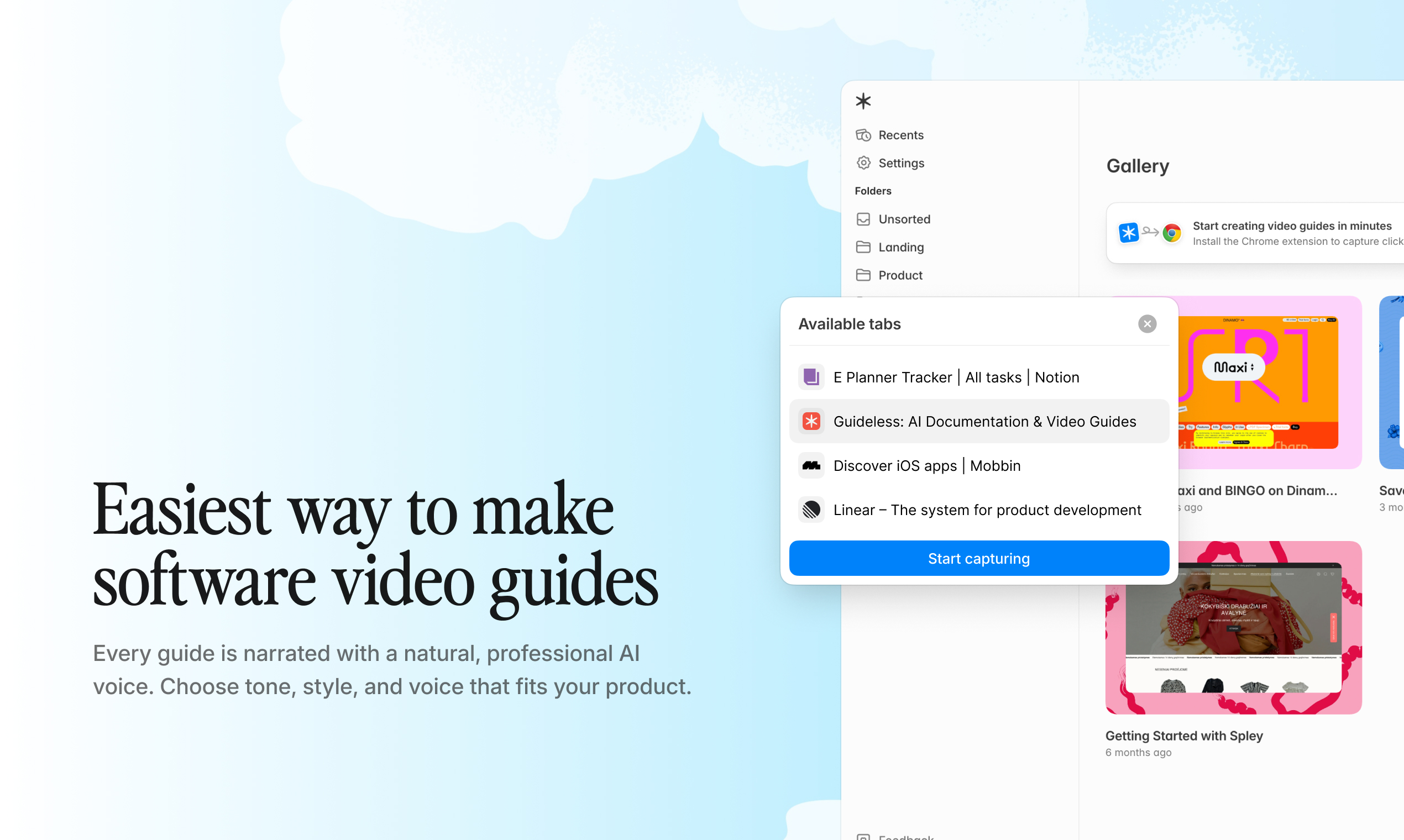
Guideless allows users to capture workflows via a browser extension and automatically generates narrated video guides with captions and visual highlights.
4. Capture workflows and generate video guides
With the right tool, making a guide is simple. You just click through the workflow once, and the system creates a structured guide for you.
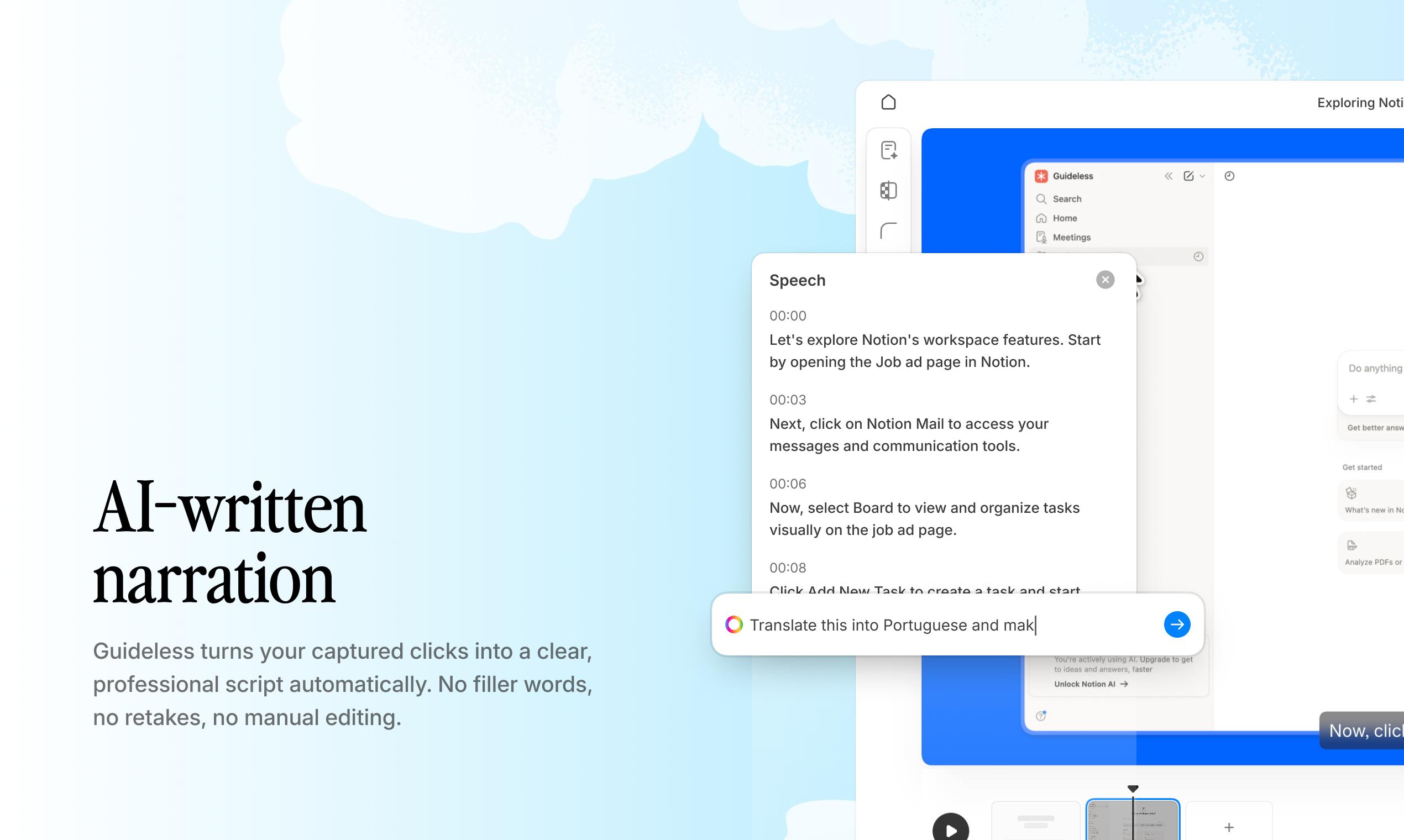
AI-powered tools automatically add captions, voiceovers, and visual highlights. Even people who are not native speakers or video experts can generate professional-quality guides in just a few minutes.
5. Embed guides inside existing systems
Guides are most useful when they appear where users already work. You can embed them in help centers, Notion, Confluence, product pages, and LMS systems. You can also share guides with a link or export them as MP4 files for presentations or offline viewing.
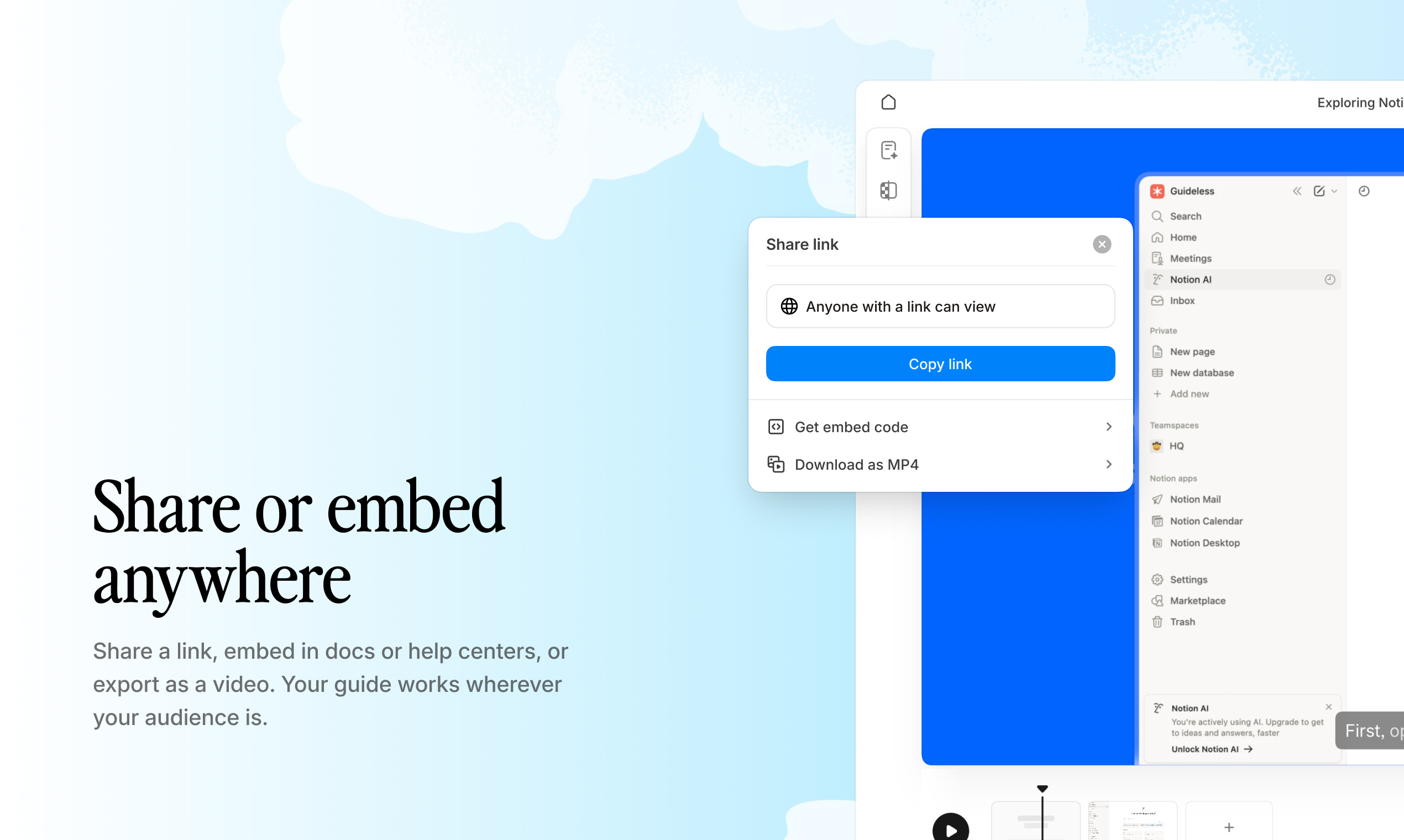
Example: Embedding and sharing a Guideless guide across different platforms.
6. Measure engagement and iterate
Track how many people view guides, finish them, and where they stop. Use analytics to identify guides that need updates or workflows that lack sufficient coverage. This feedback loop helps you fill gaps and improve training quality over time.
Best interactive training software features to look for
Workflow capture without manual recording
Users click through a process once, and the tool automatically records each step. This removes the need for screen recording setup, scripting, or video editing.
AI-generated narration and scripting
The tool can automatically create a natural-sounding voiceover from a script. This means anyone can make professional-quality guides, no matter their video experience or native language.
Multilingual training support
Guides can be narrated in different languages without needing to re-record them. This makes it easy to train global teams and international customers.
Analytics and engagement metrics
You can track who watched guides, how long they watched, and where they stopped. This helps you see how effective your training is and identify any knowledge gaps.
Embedding and sharing options
You can embed guides in Confluence, Notion, help centers, or share them with a link. Placing training where users already work makes things easier for everyone.
Update and maintenance workflows
When software changes, you can easily re-record and update guides. This keeps your training content accurate without having to start over.
Benefits of replacing static documentation with video guides
Faster employee and customer onboarding
New hires and customers become productive faster when they can see exactly what to do. According to Userpilot, 74% of potential customers will switch to other solutions if onboarding is complicated. Asynchronous video guides can replace live onboarding calls and help reduce time-to-value.
Reduced support ticket volume
Reusable video guides answer common questions before users communicate with support. Intercom reports that digital self-service options like these can reduce support volume by 25 to 30 percent, making time for more complex issues.
Consistent training quality across teams
Every user gets the same structured walkthrough, no matter who created it. This removes the inconsistency introduced by ad hoc explanations.
Lower maintenance cost over time
It is faster to update a video guide than to rewrite documentation. Centralized guides also reduce duplicate content in wikis and help centers.
Best practices for creating interactive training guides
Keep guides short and task-focused
Each guide should focus on one specific workflow or task. Do not combine multiple processes into a single long video.
Update guides when workflows change
Set up a regular review schedule that matches your product release cycles. Re-capture workflows right after any user interface or process changes to avoid knowledge gaps.
Embed guides where users need them
Place guides where they are needed most, such as in onboarding emails, help center articles, internal wikis, or product tooltips. This shortens the path from a user's question to the answer.
Track engagement to identify knowledge gaps
Use analytics to find guides with low completion rates or high drop-off. Create new guides for workflows that lack sufficient coverage but often result in support tickets.
Who should replace static documentation with interactive training
- Customer success and onboarding teams: Replace live onboarding calls with on-demand video guides and scale customer education without increasing headcount.
- Product managers and product marketing: Release features with clear, structured walkthroughs and reduce friction in product adoption.
- Support and help center teams: Turn repetitive support questions into reusable video answers and deflect tickets by embedding guides in help center articles.
- Operations and enablement leaders: Document internal SOPs for employee training and create a single source of truth for tools like Salesforce or Workday.
Instead of writing documentation, record your workflow once. Guideless automatically turns it into a structured, narrated guide.
Replace static documentation with a scalable training system
Switching from static documentation to interactive training is important because static formats do not match how users actually learn. Over time, maintaining static content becomes harder; it gets outdated, and teams cannot see if their efforts are working. However, making the switch can bring challenges. Teams may resist changing established processes, and setting up new tools can require an initial investment of time and resources. To make the transition smoother, communicate the benefits early, run a pilot with a small group, and provide training so everyone feels confident using the new tools.
Interactive training with structured video guides brings clarity, scales easily, and allows you to measure engagement. Users see exactly what to do, and teams can create content in minutes instead of hours.
Analytics show you what is working and what needs improvement.
Example: Tracking views, engagement, and drop-off points inside a Guideless guide.
Guideless captures workflows and automatically creates ready-to-use guides with narration, captions, and visual highlights. You do not need to script, edit, or have any video experience.
Frequently Asked Questions: Replacing Static Documentation with Interactive Training
How quickly can you create an interactive training guide?
Using workflow capture tools such as Guideless, you can create a guide in just a few minutes by simply clicking through the process one time. There’s no need for scripting, setting up recordings, or editing.
Is it possible to export interactive training guides as MP4 videos?
Yes, the majority of interactive training tools let you export guides as MP4 files, making them suitable for LMS platforms, presentations, or offline access.
How can teams keep interactive training content up to date with frequent software changes?
When software updates occur, teams can simply re-capture the workflow and quickly regenerate the guide, taking just minutes instead of the lengthy process of rewriting static documentation.
How are interactive training guides different from regular screen recordings?
Interactive training guides provide step-by-step instructions, complete with automatic captions, narration, and highlighted visuals. In contrast, screen recordings are raw captures that must be manually edited before they’re useful.
Can guided training tools provide content in multiple languages?
Yes, solutions like Guideless include AI-generated voiceovers in multiple languages, making it easy for teams to produce multilingual training content without re-recording.