The Hidden Cost of Bad Onboarding (And Why Most Teams Ignore It)

Most teams don’t lose users because their product is bad - they lose them because users never get to the point where it starts to click.
The gap between signup and first real value is where growth quietly breaks. No alerts, no clear signal - just users leaving before they ever understand what your product can actually do. And when it happens at scale, it doesn’t look like a problem - it just looks like “normal churn.”
That’s why onboarding exists, but most teams approach it the wrong way. Instead of fixing how users learn, they add more tools, more steps, or more documentation - and hope it helps.
In reality, what matters is how quickly you can show value, not how much you explain. The teams that get this right aren’t adding more - they’re changing how onboarding works entirely.
What Is User Onboarding Software (And Why Most Tools Fall Short)
User onboarding software is designed to help new users reach value faster. Tools like Pendo, Appcues, UserGuiding, and Userflow offer product tours, checklists, and in-app guidance to walk users through the product.
In practice, most of these still rely on users paying attention in the moment - and that’s where things often break. Many users skip, rush, or ignore these experiences entirely.
One quick distinction: user onboarding software focuses on product users (your customers), while employee onboarding software handles HR processes like paperwork and compliance training. The tools, workflows, and goals are completely different.
Why Onboarding Drives Product Adoption (And Where It Quietly Breaks)
Users who understand a product will use it.
The problem is - most never get that far.
74% of potential customers will switch to a competitor if onboarding feels too complicated. The link between onboarding and adoption really is that direct. But when onboarding fails, it rarely looks dramatic. There’s no clear drop, no obvious error - just slower activation, lower usage, and users quietly disappearing.
Activation Failure and Early Churn
Activation is the moment when a user experiences real product value for the first time - for example, completing a workflow, generating a report, or connecting an integration. When onboarding fails to guide users to this moment, they abandon the product before ever understanding what it does. And when this happens at scale, it doesn’t look like a failure - it just shows up as early churn.
Nearly 75% of users drop off between Week 0 and Week 1, and poor onboarding is often the root cause.
Support Burden from Repetitive Questions
When onboarding is unclear, support teams end up answering the same questions over and over instead of focusing on higher-value work.
Each new user who gets stuck creates another ticket, another call, another explanation. As your user base grows, this doesn't scale linearly - it compounds.
Effective onboarding deflects questions before they happen, reducing support volume by up to 83%. Users find answers on their own, and support teams focus on complex issues instead of basic how-to questions.
Manual Onboarding Does Not Scale
Live walkthroughs and onboarding calls require synchronous time from your team. One customer success manager can only handle so many calls per day. As your customer count increases, this approach doesn’t just slow down - it becomes impossible to sustain.
Scalable onboarding replaces repetitive human effort with reusable content. One well-designed guide can serve thousands of users without additional time investment - which is why many teams shift toward asynchronous onboarding models.
Knowledge Decay and Outdated Documentation
Knowledge decay happens when documentation becomes inaccurate after product changes. A feature moves, a workflow changes, and suddenly your onboarding content creates more confusion than clarity.
The faster your product evolves, the faster your onboarding content becomes outdated. And maintaining it often turns into a constant catch-up cycle.
Tools with easy update workflows help reduce this burden - but the real challenge isn’t just creating content, it’s keeping it relevant over time.
This is where most teams try to fix onboarding - by choosing the "right" tools.
Types of User Onboarding Platforms
Different onboarding tools solve different problems. But choosing the wrong type often creates more friction instead of reducing it - especially when the format doesn’t match how users actually learn. Understanding the categories helps you choose the right approach.
| Type | Best for | Limitations |
|---|---|---|
| In-app guidance | Real-time product navigation | Requires engineering resources |
| Interactive walkthroughs | Step-by-step task completion | Limited to in-product usage |
| Video-based guides | Complex workflow explanation | Traditionally slow to create (now changing with AI tools) |
| Knowledge bases | Self-serve reference | Often ignored by users |
Most teams rely on one approach - but the best onboarding combines multiple formats depending on the use case. And that’s often where things start to break.
In-app guidance and product tours
Product tours are overlay tooltips that highlight features within your product interface. They appear as users navigate, pointing out buttons, explaining features, and guiding actions in real time.
Product tours work well for simple feature discovery. However, they require users to be inside the application and often need engineering resources to implement.
Interactive walkthroughs and onboarding checklists
Checklists track user progress toward activation milestones. They show users what steps to complete and celebrate progress along the way. Interactive walkthroughs take this further by guiding users through each click.
Both formats work well for linear onboarding flows where users follow a predictable path.
Video-based onboarding guides
Video guides show users exactly what to do. They demonstrate workflows visually, which many users prefer over reading text instructions.
Traditional video creation is slow—recording, editing, adding voiceover, and maintaining content as products change. Modern tools like Guideless generate video guides automatically from screen recordings, reducing creation time from hours to minutes.
Knowledge base and self-serve support tools
Knowledge bases are searchable repositories of help articles. They serve as reference material for users who want to look something up.
The limitation: many users skip text documentation entirely. They prefer visual demonstrations or interactive guidance over reading paragraphs of instructions.
Even with the right tools, many teams still struggle - because the problem isn’t just what they use, but how onboarding is delivered and consumed.
What to look for in user onboarding tools
When evaluating onboarding platforms, focus on criteria that affect long-term operational impact.
No-code builder for non-technical teams
No-code tools allow product, customer success, and support teams to create onboarding content without engineering involvement. This removes bottlenecks and speeds time-to-publish.
If every content update requires a developer, your onboarding will always lag behind your product.
User segmentation and targeting
Segmentation lets you show different onboarding content to different user types:
- Role-based targeting: Show admin features only to admin users
- Lifecycle targeting: Show different content to new versus returning users
- Behavior targeting: Trigger guidance based on specific user actions
Generic onboarding treats all users the same. Targeted onboarding meets users where they are.
Multilingual support and localization
Global products need onboarding in multiple languages. Some tools offer AI-powered localization that generates translated content automatically, while others require manual translation for each language.
Analytics and engagement tracking
The metrics that matter: completion rates, drop-off points, and time-to-activation. Tracking reveals which content works and which needs improvement.
Without analytics, you're guessing about onboarding effectiveness.
Content versioning and easy updates
Products change constantly. Your onboarding content needs to keep pace. Tools with easy update workflows reduce the maintenance cost of keeping content current.
Choosing a tool won’t fix onboarding on its own - but it directly impacts how scalable, maintainable, and costly your onboarding becomes over time.
How to evaluate SaaS customer onboarding software
A structured evaluation process helps you choose the right tool for your specific situation.
1. Define your onboarding and activation goals
Start by identifying what success looks like for your users. What is the first value moment? Examples include completing the first workflow, generating the first report, or inviting the first team member.
2. Assess implementation complexity
Consider the time and resources required to get started. How long until the first guide is live? What technical resources are needed?
Browser-based capture tools like Guideless require minimal setup—you can create your first guide within minutes of signing up. In-app guidance tools may require engineering integration over several weeks.
3. Review integration requirements
Common integrations to evaluate:
- Analytics platforms: Mixpanel, Amplitude, Heap
- Help centers: Zendesk, Intercom, Notion
- CRMs: Salesforce, HubSpot
The right integrations connect your onboarding data to your broader customer intelligence stack.
4. Test content creation speed
Run a practical test: how long does it take to create one complete onboarding guide? Compare traditional recording and editing workflows against AI-assisted generation.
The difference often determines whether your team will actually maintain onboarding content over time.
5. Evaluate long-term maintenance costs
Knowledge decay is the hidden cost of onboarding systems. How easy is it to update content when features change?
A tool that's fast to set up but slow to maintain will create problems six months later.
Top User Onboarding Platforms Compared (And Where They Fall Short)
Most onboarding platforms focus on guiding users inside the product. But that’s only part of the problem.
| Platform | Primary strength | Best fit |
|---|---|---|
| Pendo | Analytics + in-app guidance | Enterprise product teams |
| Appcues | Retention-focused flows | Growth and PLG teams |
| UserGuiding | Affordable no-code builder | Small to mid-size teams |
| Userflow | AI-powered adoption | Teams scaling onboarding |
| Guideless | AI-generated video onboarding | Teams explaining complex workflows |
The limitation isn’t the tools themselves - it’s the format. Most assume users will learn by doing, even when they don’t yet understand what to do.
Pendo
Pendo combines product analytics with in-app guidance, connecting usage data directly to onboarding flows. Its strength is visibility - but that comes with higher complexity and cost, making it better suited for larger teams.
Appcues
Appcues focuses on retention, guiding users from first login through long-term engagement. Its strength is targeting and experimentation - though it still relies heavily on users interacting with in-app flows.
UserGuiding
UserGuiding offers a no-code platform for product tours, checklists, and surveys. It’s accessible for smaller teams that want to get started quickly, without heavy setup or engineering support.
Userflow
Userflow is an AI-powered platform for building onboarding flows and in-app support. Its strength is automation and scalability for teams growing their onboarding efforts.
Guideless
Guideless takes a different approach. Instead of relying only on in-app guidance, it turns real workflows into structured video guides with AI narration.
This allows teams to show users how things work before they get stuck - instead of expecting them to figure it out themselves.
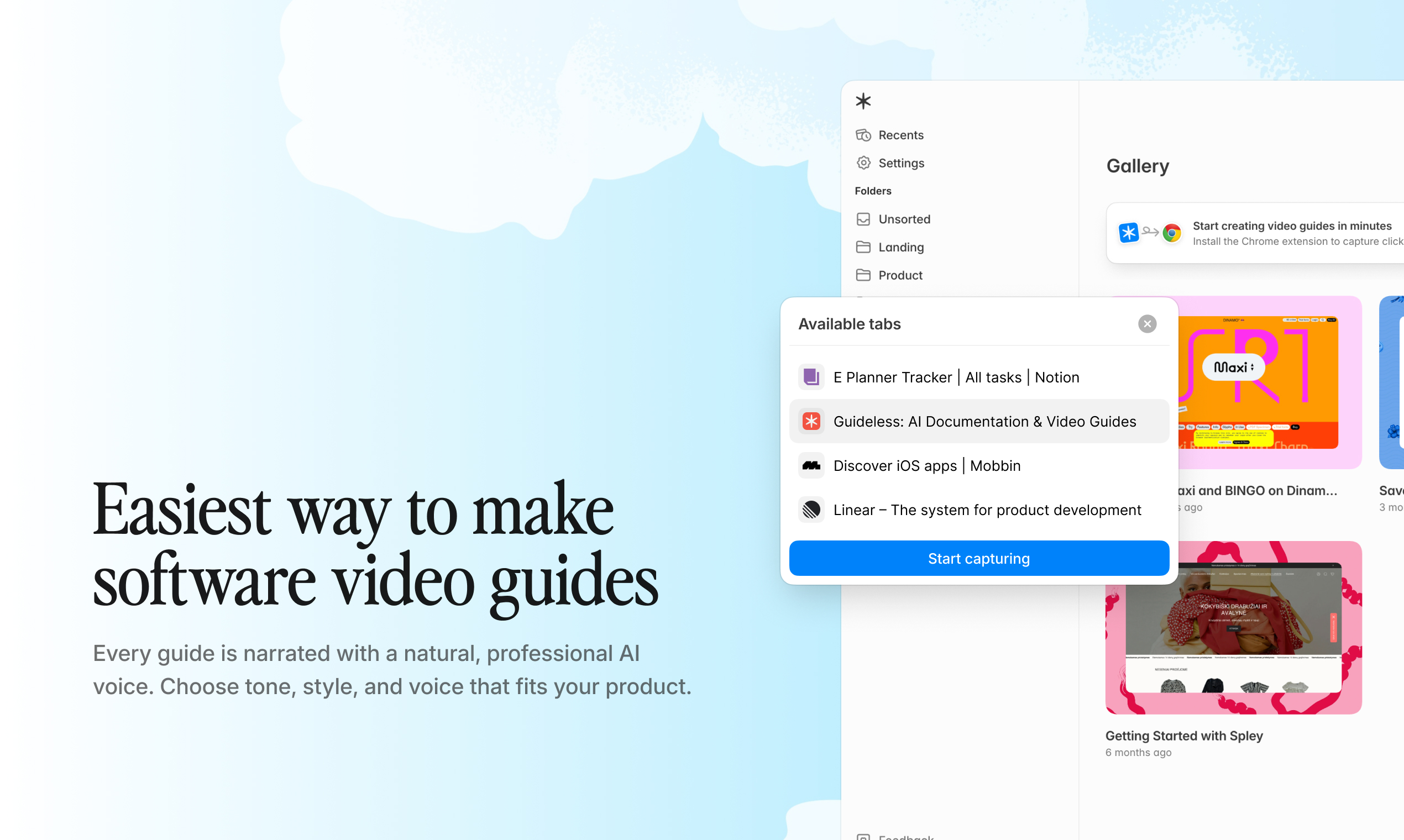
This is where video-based onboarding starts to stand out.
How Video Guides Support Scalable User Onboarding
Video works for onboarding because users prefer watching over reading. A two-minute video showing exactly what to click is often more effective than a long help article users won't read.
The traditional challenge is speed. Recording, editing, adding voiceover, and keeping content updated as the product changes takes significant time - which is why most teams don’t create nearly as much onboarding content as they actually need.
AI-generated video guides change this completely - especially for teams dealing with complex workflows. Tools like Guideless let you capture a workflow once and automatically turn it into a structured guide with narration, captions, and visual highlights.
Creation time drops from hours to minutes, and one guide can support unlimited users without additional effort. See real examples in the Guideless gallery.
How to Choose a Customer Onboarding Platform
Match the tool type to your primary use case, but don't assume one tool will solve everything. Many teams use multiple tools together:
- In-app guidance for real-time prompts within the product
- Video guides for explaining workflows and complex processes
- Knowledge bases for searchable reference material
Also consider your team's capacity to create and maintain onboarding content. The best tool isn’t the most advanced - it’s the one your team will actually keep up to date and use consistently.
At the end of the day, onboarding isn’t about guiding users - it’s about helping them understand faster.
If you're ready to create onboarding that actually gets used - not ignored - you can get started for free in minutes and create your first guide right away.
FAQs About User Onboarding Software
What is the difference between user onboarding software and employee onboarding software?
User onboarding software helps customers understand and use your product - ideally getting them to value as quickly as possible. Employee onboarding software, on the other hand, focuses on HR processes like paperwork, compliance training, and internal company orientation.
The key difference is impact: user onboarding directly affects activation, retention, and revenue. And the faster users understand how your product works, the more likely they are to stick - which is why many teams invest in more visual, easy-to-consume onboarding formats instead of relying only on documentation.
How long does it take to implement user onboarding software?
Implementation time varies by platform. In-app tools often require engineering integration, which can take several weeks before anything goes live.
Browser-based capture tools can produce the first guide within minutes of signup. In practice, the faster teams can create onboarding content, the more likely they are to keep it updated and actually use it.
That’s why many teams move toward lightweight, video-based onboarding approaches - where creating and updating content doesn’t depend on engineering resources.
Can user onboarding software integrate with enterprise tools like Salesforce or Workday?
Most user onboarding platforms offer integrations with CRMs, analytics tools, and help centers. Integration depth varies, so it’s important to evaluate specific connectors during trials.
However, not all onboarding approaches depend heavily on integrations. Some tools focus more on how onboarding content is created and delivered - reducing the need for complex setup while still helping users understand workflows quickly.
How do teams keep onboarding content updated when products change?
The most maintainable approach is choosing tools with fast, flexible update workflows. Look for platforms that allow teams to modify onboarding content without rebuilding everything from scratch.
In practice, this is where many onboarding systems fail - not when content is created, but when it needs to be updated. As products evolve, outdated onboarding quickly creates confusion instead of clarity.
That’s why teams are shifting toward formats that are faster to update and easier to maintain over time, rather than relying on static documentation or complex flows.
Do teams use in-app onboarding or video-based onboarding?
Most teams benefit from both - but in practice they solve very different problems.
In-app onboarding works best for real-time prompts inside the product, guiding users step by step as they interact with the interface.
Video-based onboarding is more effective for explaining workflows before users try to execute them - especially when processes are complex or span multiple steps or systems.
The key isn’t choosing one over the other - it’s using each where it actually helps users understand faster.