Visual Tutorial Generator for Training, Onboarding, and Software Support

Creating software tutorials used to mean recording your screen, writing a script, editing footage, adding captions, and redoing the whole thing whenever the workflow changed.
A visual tutorial generator removes that manual work. You complete a software process once, and the tool turns it into a structured, narrated walkthrough with captions, AI voiceover, and clear step-by-step guidance.
Teams use visual tutorial generators to create onboarding guides, support tutorials, SOPs, and product walkthroughs in minutes instead of hours. In this guide, we’ll explain how they work, what features matter most, and how tools like Guideless help teams scale training and support content without manual video production.
What is a visual tutorial generator
A visual tutorial generator is software that turns software workflows into step-by-step video guides automatically. Instead of recording raw screen footage and editing it manually, you click through a process once and the tool captures each action, organizes the steps, writes a narration script, and generates a polished walkthrough.
This makes it different from a traditional screen recorder. Screen recording tools capture what happens on your screen, but you still have to edit the footage, write the explanation, add voiceover, and format the final tutorial yourself.
Guideless goes further by using AI to generate structured narration, natural-sounding voiceover, captions, and branded visual guides from a captured workflow. The result is a finished tutorial that is easier to create, easier to update, and easier for users to follow.
Unlike static documentation tools or screen recorders, Guideless automatically creates narrated, step-by-step tutorials from workflows.
Why teams use visual tutorial generators for how-to guides
Teams adopt visual tutorial generators because traditional tutorial creation is slow, difficult to maintain, and hard to scale. Recording videos manually, updating documentation, and running repeated training sessions quickly becomes time-consuming as teams grow.
Traditional tutorial creation does not scale well. As products evolve, videos become outdated, documentation breaks, and teams spend more time maintaining training content than creating it. Visual tutorial generators solve this by automating both tutorial creation and ongoing updates.
Visual tutorial generators simplify that process by turning workflows into reusable, structured walkthroughs automatically.
Reduce time spent on manual video production
Creating tutorial videos traditionally takes far more work than most teams expect. Recording the workflow is only one part of the process. Teams still need to trim footage, write scripts, add captions, record voiceover, and often start over when something changes or a mistake happens during recording.
According to HubSpot, creating a video can take weeks from start to finish.
With a visual tutorial generator, the workflow is captured once and automatically turned into a narrated guide. Instead of spending hours editing and formatting content manually, teams can create professional tutorials in just a few minutes.
Replace static documentation with visual walkthroughs
Most people do not want to read long documentation when they are trying to complete a task. Screenshots and written instructions are often difficult to follow, especially for complex workflows with multiple steps.
Visual walkthroughs make software easier to learn because users can follow the exact process step by step while seeing every click and action in context. Narration and captions provide additional guidance, helping users understand not just what to do, but why they are doing it.
This is one reason video-based learning consistently drives higher engagement than static documentation.
Scale training and onboarding without live sessions
Traditional onboarding often depends on live walkthroughs and repeated training calls. As more employees or customers need training, the amount of manual support required increases as well.
Visual tutorials solve this by making onboarding asynchronous and reusable. Teams create a guide once and use it repeatedly across onboarding, support, and enablement workflows.
This allows companies to scale training without increasing the amount of time managers, customer success teams, or support teams spend repeating the same explanations.
Create professional output without video editing skills
Traditional tutorial creation tools often require video editing experience to produce polished results. The final quality depends heavily on the person creating the content, which leads to inconsistent tutorials across teams.
Visual tutorial generators automate the formatting, narration, captions, and structure of the guide. This allows teams to create polished training content without needing video editing experience.
With tools like Guideless, teams can create branded, AI-narrated walkthroughs that look consistent across onboarding, training, and customer education content.
How a visual tutorial generator works
Creating a visual tutorial is designed to be simple. Instead of recording, editing, scripting, and formatting everything manually, the platform turns your workflow into a structured guide automatically.
Here’s how the process typically works.
Step 1. Capture your workflow
Start by installing the browser extension and launching a new capture. Then simply complete the workflow as you normally would.
The platform automatically records clicks, navigation, actions, and on-screen steps while you work.
There is no need to prepare a script, configure recording software, or plan edits ahead of time. You simply perform the task once, and the workflow is captured automatically.
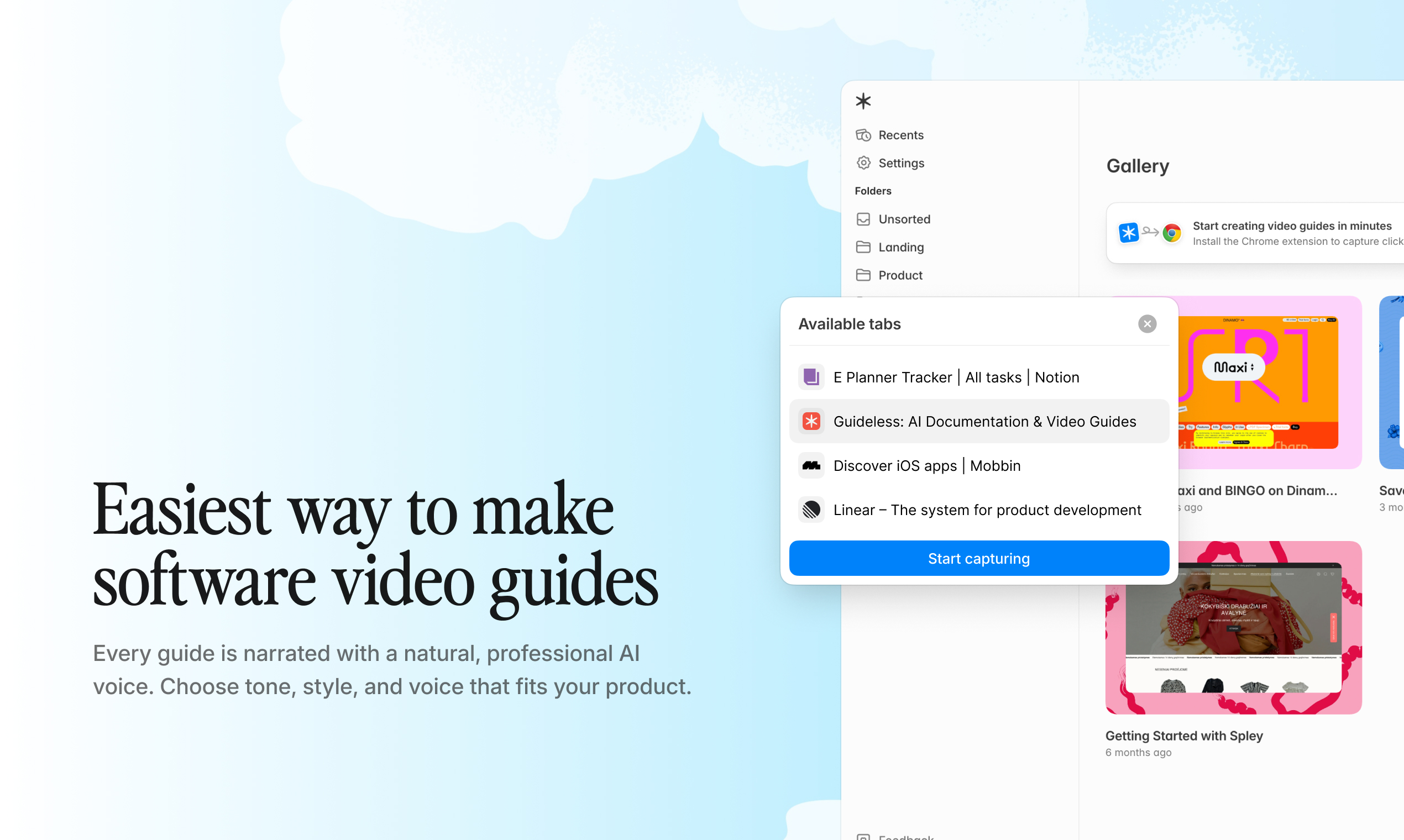
Capturing workflows in Guideless browser extension
Step 2. Generate the visual guide automatically
Once the capture is complete, the platform turns the workflow into a structured visual guide.
AI analyzes each action, organizes the process into clear steps, generates captions, and creates a narration script automatically. Instead of one long recording, the tutorial becomes a step-by-step walkthrough that is easier to follow and easier to update later.
This removes most of the manual editing work normally required to create tutorials.
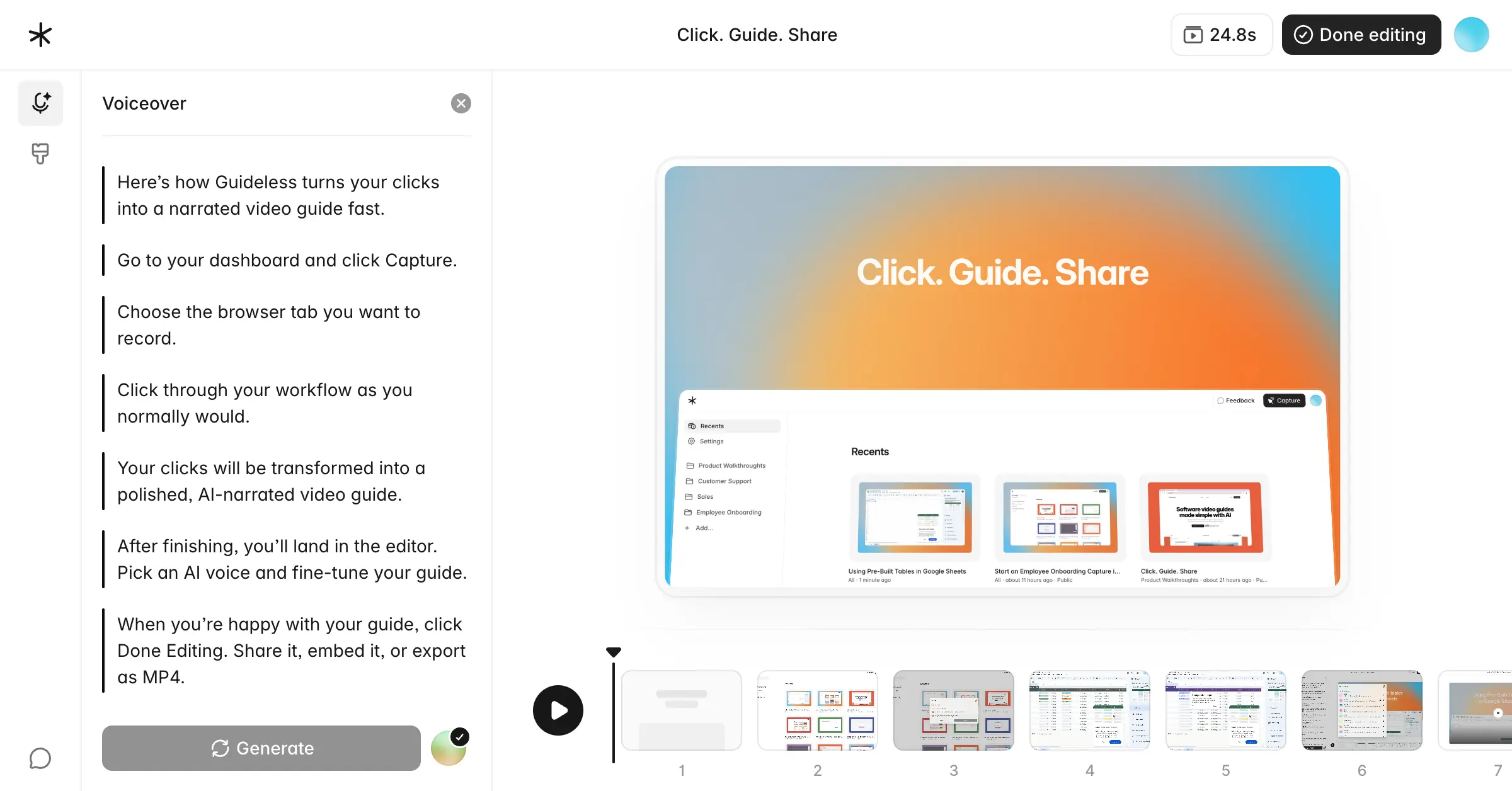
Generating tutorials in Guideless
Step 3. Customize branding and narration
After the draft is generated, teams can customize the guide to match their brand and communication style.
You can edit narration, update individual steps, apply company colors and logos, and choose from multiple AI voiceover styles and languages. This helps maintain a consistent experience across onboarding, training, and customer education content.
Most visual tutorial generators also support multilingual voiceovers, making it easier to create localized training materials without re-recording the workflow.
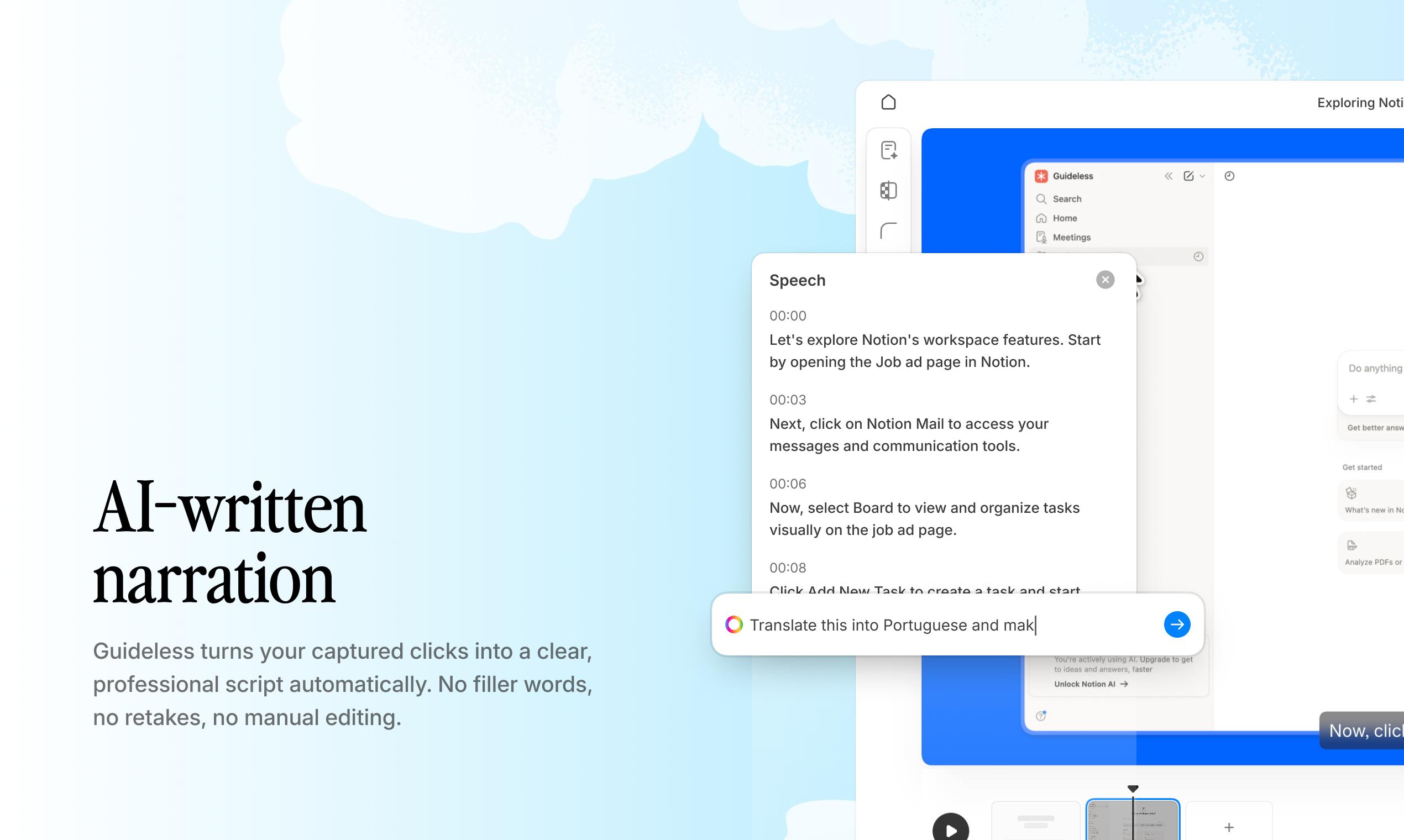
Customizing branding and narration in Guideless
Step 4. Share, embed, or export
Once the guide is ready, it can be shared across teams, customers, or documentation platforms in just a few clicks.
- Share via link: Send a direct URL to anyone who needs the guide.
- Embed in documentation: Add the guide to Notion, Confluence, or your help center.
- Export as video: Download the file as an MP4 for use anywhere.
The guide can be updated at any time without starting over.
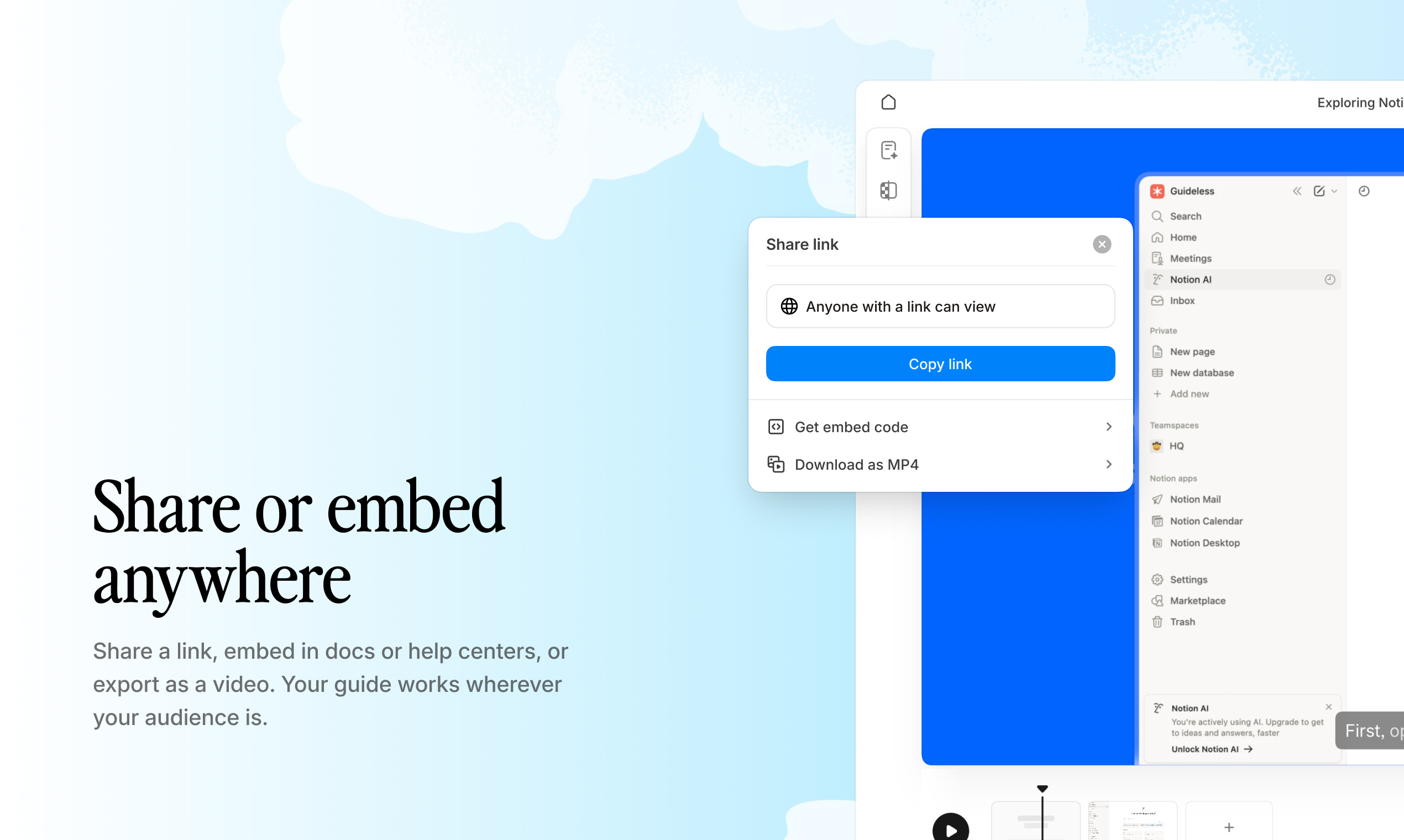
Sharing and embedding tutorials across teams
Key features of an automated visual tutorial generator
When evaluating visual tutorial generators, focus on the features that improve tutorial quality, reduce manual work, and make guides easier to scale across teams.
The best platforms do more than record workflows. They help teams create structured, branded, and reusable training content that stays easy to maintain over time.
AI narration and voiceover generation
One of the biggest advantages of a visual tutorial generator is automated narration.
Instead of writing scripts manually or recording voiceovers yourself, AI analyzes the captured workflow and generates narration automatically based on the actions performed during the process.
Most platforms also allow teams to edit narration at the guide level or individual step level, making it easy to adjust tone, wording, or additional context when needed.
This removes one of the most time-consuming parts of traditional tutorial production and allows teams to create polished training videos much faster.
Example: AI-generated narration and step-by-step tutorial creation in Guideless
Multi-language support for global teams
Modern visual tutorial generators often support AI voiceover in multiple languages, allowing teams to localize tutorials from a single workflow capture.
Instead of re-recording tutorials for every region or hiring translators for voiceover production, teams can generate localized versions automatically using AI-generated narration.
Multi-language support is especially useful for global onboarding, multilingual customer support, international product training, and distributed teams that need consistent learning materials across regions. It helps companies scale training content consistently across different markets and user groups.
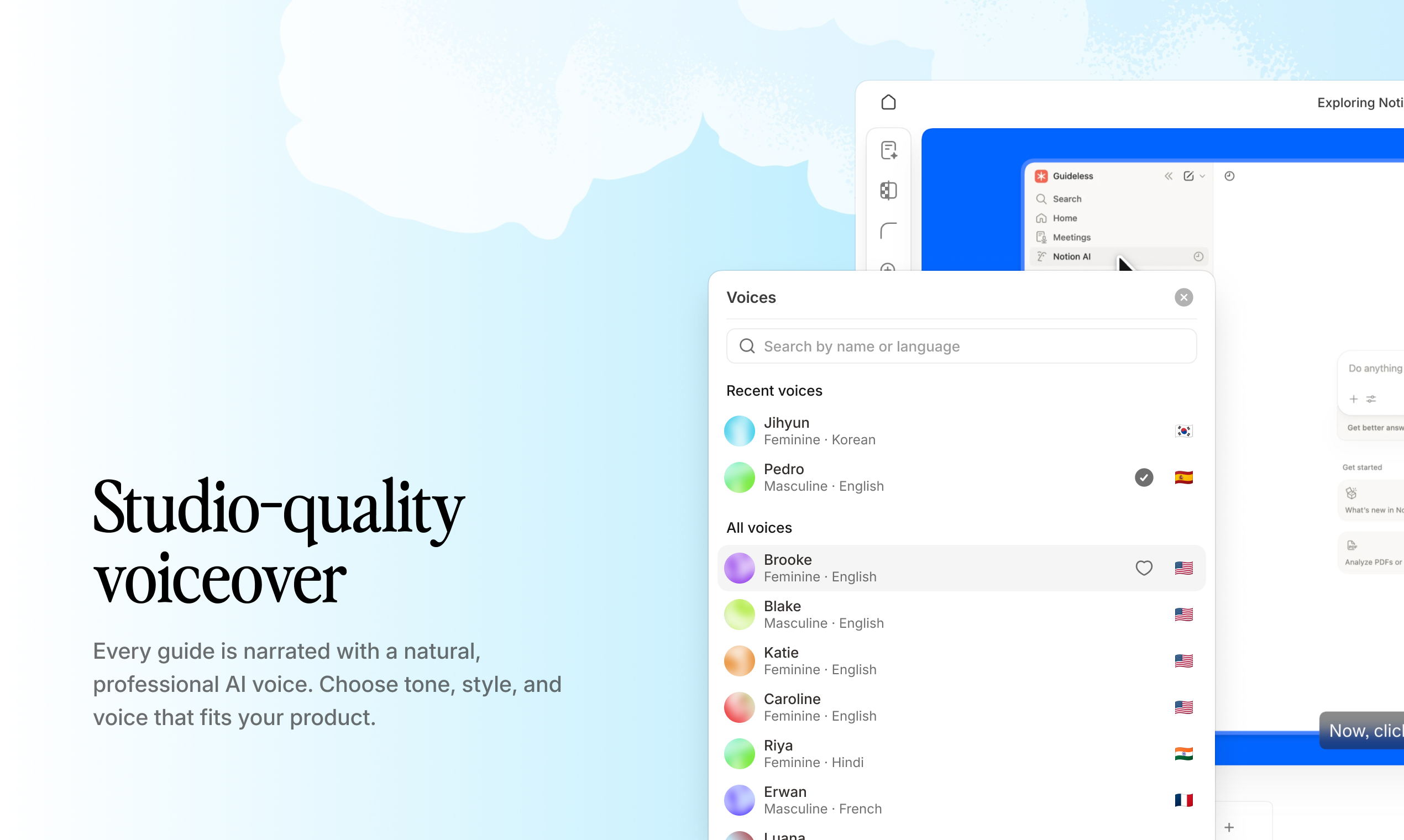
Generating multilingual software walkthroughs in Guideless
Brand customization and visual styling
Brand consistency matters across onboarding, support, and customer education content.
Visual tutorial generators allow teams to customize tutorials with company colors, logos, backgrounds, and visual themes so guides feel aligned with the rest of the product experience.
This helps tutorials look more professional and creates a more cohesive learning experience for both employees and customers.
With tools like Guideless, branding can be applied automatically across every generated guide, reducing the need for manual formatting and design work.
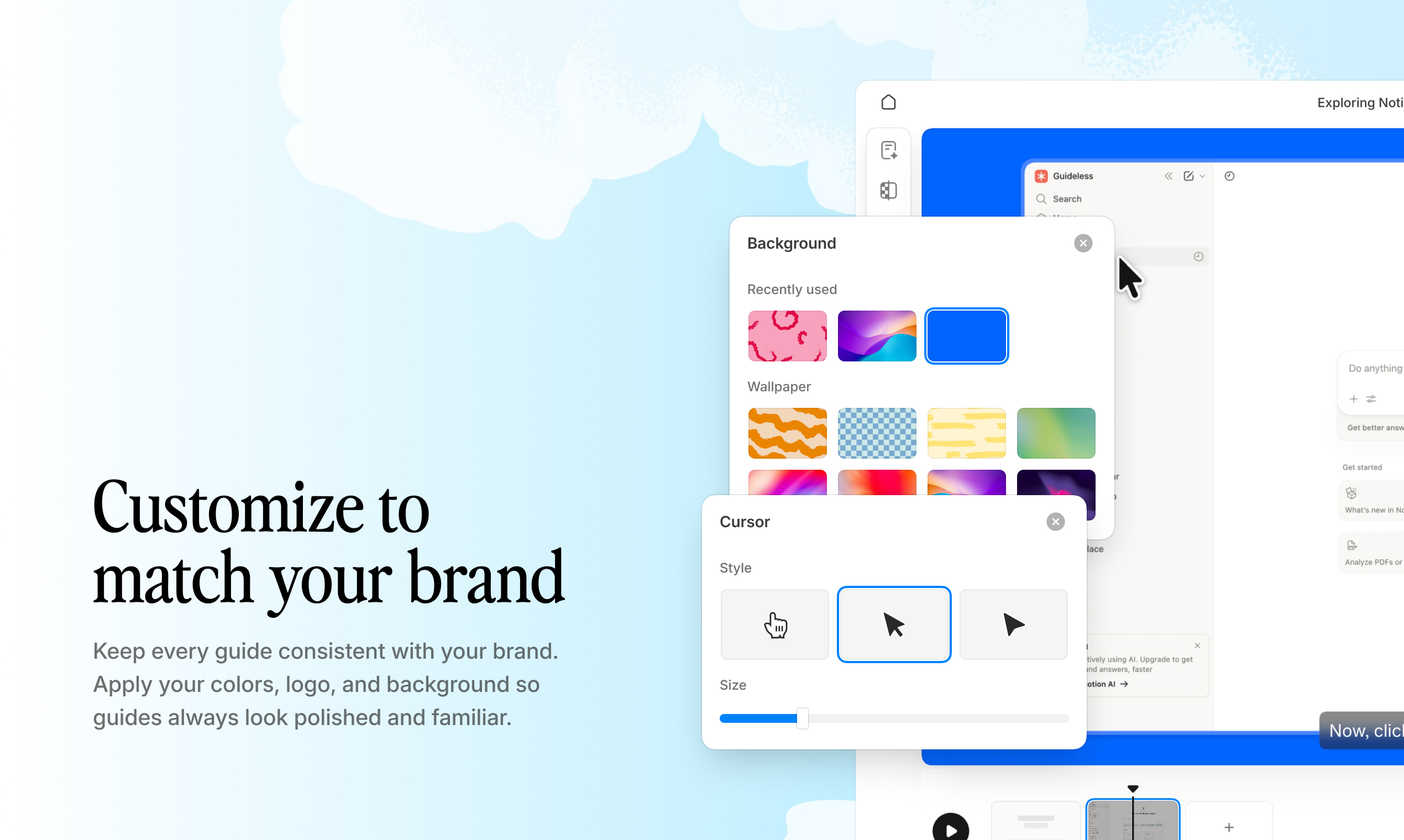
Applying custom branding and styling to tutorials in Guideless
Analytics and engagement tracking
Built-in analytics help teams understand how tutorials are performing after they are shared.
Metrics such as views, completion rates, engagement, and drop-off points make it easier to identify where users are getting stuck and which guides are most effective.
Over time, this helps teams improve onboarding, training, and support content using real usage data instead of assumptions.
Analytics are especially valuable for customer onboarding and internal enablement because they provide visibility into how people interact with tutorial content.
Example: Tutorial engagement analytics in Guideless
Use cases for AI video generator training and onboarding
These platforms support multiple teams across a business, from employee onboarding to customer education and support. Because guides are reusable, easy to update, and faster to create than traditional documentation, companies can scale training content without increasing manual work.
Employee onboarding and internal training
New employees often struggle to learn internal systems through static documentation alone. Long SOPs and screenshot-heavy instructions can make workflows difficult to follow, especially when multiple tools or steps are involved.
Visual tutorials make onboarding easier by showing employees exactly how to complete tasks inside the actual software environment. Instead of reading instructions and trying to interpret screenshots, employees can follow a structured walkthrough step by step while seeing every action in context.
This helps reduce onboarding time, improve process consistency, and free up managers from repeating the same training sessions for every new hire.
Explore the best onboarding software for HR and people teams.
Customer onboarding and product adoption
Customers increasingly prefer self-service onboarding instead of scheduling calls or searching through documentation.
Visual walkthroughs help users understand products faster by guiding them through key workflows in a structured, easy-to-follow format. Rather than relying on lengthy help articles, customers can learn directly through narrated tutorials that demonstrate exactly how the product works.
For SaaS companies, this improves product adoption, accelerates time-to-value, and reduces the amount of manual onboarding support required from customer success teams.
Customer support and help center content
Support teams often spend significant time answering the same workflow questions repeatedly.
These tools allow companies to turn repetitive support explanations into reusable walkthroughs that customers can access anytime. Instead of writing long ticket responses or recording custom videos manually, support teams can quickly generate visual guides for common questions and workflows.
These tutorials can be embedded directly into help centers, onboarding flows, support documentation, or customer communication, helping users resolve issues faster without waiting for live assistance.
Browse the Guideless guide gallery for support and onboarding examples.
Feature education and change management
When products evolve, users need clear guidance on what changed and how new workflows work.
Visual tutorials make it easier to communicate feature releases, UI updates, and operational changes without rewriting large amounts of documentation or organizing live training sessions. Teams can simply capture the updated workflow and generate a new walkthrough in minutes.
This makes it easier to keep employees and customers up to date as workflows and products evolve.
How visual tutorials compare to static documentation
Traditional documentation still has an important role, especially for policies, technical references, and detailed written information. However, when users need to learn workflows or complete tasks inside software, visual tutorials are often easier to follow and faster to consume.
Unlike static documentation, visual walkthroughs show users exactly where to click, what actions to take, and how each step fits into the overall process. This reduces confusion and makes onboarding, training, and support content more effective.
| Feature | Static documentation | Visual tutorial generator |
| Format | Text and screenshots | Narrated video walkthrough |
| Creation time | Hours of writing and formatting | Minutes to generate |
| Engagement | Lower engagement | Higher video engagement |
| Updates | Manual rewrites | Quick re-generation |
| Scalability | Hard to maintain | Reusable at scale |
| Learning experience | Harder to follow | Step-by-step guidance |
| Localization | Manual translation | AI multilingual support |
Visual tutorials are not a replacement for every type of documentation. However, for onboarding, software training, and workflow-based guidance, visual formats are often easier to follow, faster to update, and more engaging for users.
How to choose a visual tutorial generator
Not all tutorial generators offer the same level of automation, customization, or long-term usability. When comparing tools, focus on how quickly guides can be created, how professional the output looks, and how easy tutorials are to maintain over time.
Speed of content creation
A good visual tutorial generator should drastically reduce the time required to create training content. The best platforms turn a captured workflow into a finished, shareable guide within minutes instead of requiring hours of recording, editing, and formatting.
Output quality and customization options
Tutorial quality matters, especially for onboarding and customer-facing content. Look for clear step structure, natural AI narration, readable captions, and strong branding options.
The final guide should feel polished, easy to follow, and visually consistent with your company’s brand.
Embedding and distribution flexibility
Tutorials should be easy to share wherever your team already works. Strong platforms support direct links, embedding in tools like Notion or Confluence, and exporting guides for broader distribution.
This makes onboarding, training, and support content easier to scale across teams and customers.
Update and maintenance workflows
Software workflows change constantly, so tutorials should be easy to update without recreating everything from scratch.
Modern tutorial generators simplify maintenance by allowing teams to quickly edit or re-capture parts of a guide as workflows evolve.
Tip: Tools with step-level editing make it much faster to keep tutorials accurate over time.
Create scalable visual tutorials in minutes
Capture a workflow once and automatically turn it into a structured, AI-narrated guide your team can share anywhere.
Guideless helps teams create onboarding tutorials, support walkthroughs, SOPs, and product training content without manual recording or video editing.
Create AI-powered visual tutorials with Guideless
FAQs about visual tutorial generators
Can I update a visual tutorial after my product changes?
Yes. Most visual tutorial generators allow you to edit guides or re-capture individual steps without recreating the entire tutorial from scratch. This makes it easier to keep onboarding and training content updated as workflows evolve.
How do visual tutorial generators support multiple languages?
Most platforms support AI-generated voiceovers in multiple languages. You capture the workflow once, then generate localized versions by selecting different narration languages instead of re-recording the tutorial manually.
What is the difference between a visual tutorial generator and a screen recorder?
A screen recorder captures raw footage that still requires editing, scripting, captions, and voiceover work. A visual tutorial generator automatically structures the workflow into a polished, narrated guide that is ready to share with minimal manual editing.
Can AI make educational content and narration for software walkthroughs?
Yes. AI can analyze captured workflows, generate step-by-step explanations, and create natural-sounding narration automatically. This allows teams to produce educational walkthroughs without manual scripting or voice recording.
Where can visual tutorials be embedded or shared?
Most visual tutorial generators support direct sharing links, embedding in platforms like Notion or Confluence, help center integrations, and standard video exports. This makes it easy to distribute tutorials across onboarding, support, and training workflows.