12 Best Automated Guide Creation Tools for Operations Teams (2026)

Operations teams usually don’t have trouble making guides. The real challenge is keeping those guides useful over time.
You record a workflow, write a script, edit the video, and publish it. But just a few weeks later, it’s already outdated. The process has changed, and now the guide can even be misleading.
This is where automated guide creation tools for operations teams come in.
Instead of building documentation by hand, these tools capture your workflows as you do them and automatically turn them into structured guides. What once took hours can now be done in minutes, without the need for scripting, editing, or rebuilding content each time something changes.
In this guide, we compare 12 of the best automated guide creation tools for operations teams in 2026, along with evaluation criteria, implementation tips, and common mistakes to avoid.
For a deeper look at how AI transforms process documentation, see our guide on AI process documentation tools for operations teams.
Why operations teams need automated guide creation
Automated guide creation tools not only speed up documentation, but they also make it usable for larger teams.
Most operations teams don’t have a documentation problem. They have a maintenance problem.
You create a guide, publish it, and within weeks, it’s already outdated. Not because the process was wrong, but because the software changed.
Tools that automate guide creation solve this by capturing workflows as you do them and turning them into structured, step-by-step guides automatically, so there’s no need for manual recording or editing.
Teams can now generate guides in minutes and update them just as quickly, instead of spending hours on documentation.
For teams working with tools like Salesforce, Workday, or ServiceNow, this shift is critical. By the time a manual guide is finished, the workflow has often already changed.
This leads to predictable problems:
- Knowledge decay — guides become inaccurate within weeks
- Scalability limits — live walkthroughs can’t keep up with team growth
- Inconsistent quality — output depends on who creates it
- Low consumption — static documentation gets ignored
Automated guide creation tools help by cutting the time between doing a workflow and documenting it, reducing it from hours to just minutes.
How to evaluate automated guide creation tools
Not all automated guide creation tools actually save time.
Some still require manual editing or rebuilding steps, which defeats the purpose of automation.
The right tool depends on how your team creates onboarding content, SOPs, or product walkthroughs. Focus on how much manual work the tool removes, not just its features.
Ease of capture and setup
Some tools automatically capture each click as you perform a workflow. Others rely on traditional screen recording with manual start and stop.
Click-through capture eliminates the need to manually structure steps, making it faster to create guides with minimal editing.
Automation depth and AI capabilities
Not all “AI-powered” tools are actually automated.
Many still require manual editing after capture, while others generate a ready-to-share guide instantly.
This is where tools like Guideless stand out. They turn a workflow into a structured, AI-narrated video guide without scripting or editing.
The key is simple: the less manual work required after capture, the more likely your team will actually create and update guides.
Here’s what fully automated guide creation looks like in practice. This example was generated from a single workflow in just seconds:
This guide was generated from a single recorded workflow, with no scripting or editing required.
Output formats and video quality
Automated guide creation tools differ mainly in output: video guides, screenshot-based SOPs, or interactive walkthroughs.
Each serves a different use case:
- Video — best for complex, multi-step workflows and onboarding
- Screenshots — best for quick reference and simple tasks
- Interactive demos — best for product-led sales
For operations teams, video is often the most effective format because it reduces confusion and clearly shows how to complete a workflow.
Customization and branding options
For customer or partner-facing guides, branding consistency matters.
Look for options to add logos, brand colors, custom backgrounds, and AI voice variations. This helps guides feel like part of your product, not a separate tool.
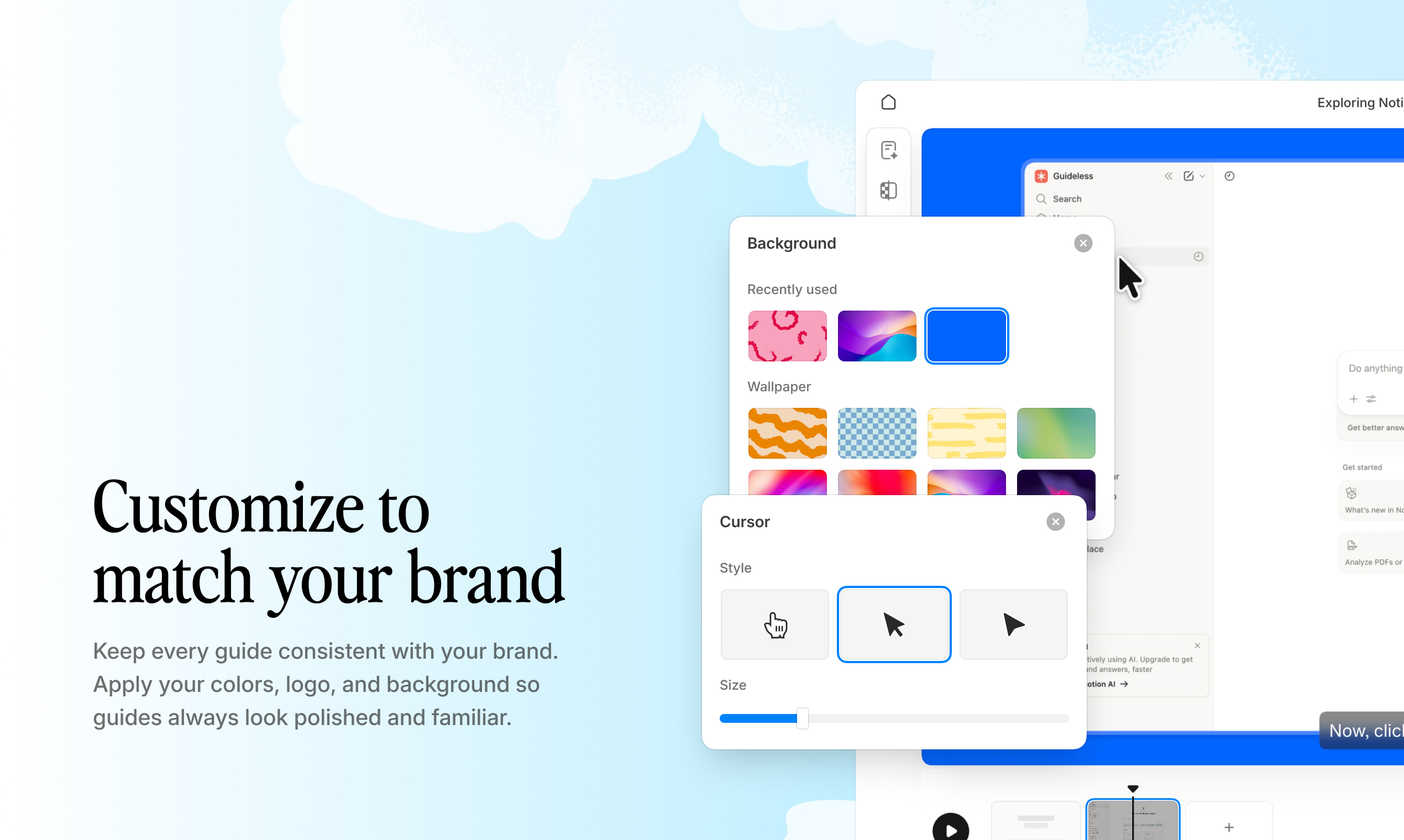
Example: A branded video guide created with Guideless, including custom colors, voiceover, and layout.
Integration with knowledge management systems
Guides are most effective when they live where users work.
Look for tools that allow embedding in platforms like Notion, Confluence, help centers, or LMS systems.
If a guide is stored in a separate tool, people are less likely to use it.
Analytics and engagement tracking
Some tools track views, completion rates, and drop-off points.
This data shows which guides actually help users and which ones are ignored, so you know which to improve or replace.
Example: You can track views, engagement, and where people drop off in a Guideless guide.
Pricing and team scalability
Pricing models vary. Some tools charge per seat, while others charge based on usage.
Pick a pricing model that grows with your team, so your costs don’t outpace adoption.
12 automated guide creation tools for operations teams compared
Automated guide creation tools are not all built the same way.
Some tools focus on video, others on screenshots or interactive demos. Each type serves a different purpose, depending on whether you’re making onboarding content, SOPs, or product walkthroughs.
Here’s a side-by-side comparison of the most popular tools, focused on how they differ in automation, output, and use case:
| Tool | Primary output | AI voiceover | Best for |
| Guideless | Video guides | Yes, 50+ languages | Customer onboarding, product education |
| Guidde | Video guides | Yes | Sales enablement |
| Scribe | Screenshot SOPs | No | Internal process documentation |
| Tango | Screenshot guides | No | Fast SOP creation |
| Loom | Screen recordings | No | Ad-hoc explanations |
| Supademo | Interactive demos | No | Product-led sales |
| iorad | Interactive tutorials | Yes | In-app guidance |
| Zight | Screenshots and GIFs | No | Quick visual communication |
| Glitter AI | Video guides | Yes | Support documentation |
| Guidejar | Interactive guides | No | Product tours |
| UserGuiding | In-app guides | No | User onboarding flows |
| Confluence | Wiki documentation | No | Enterprise knowledge base |
Most of the tools listed above still require some manual work, such as editing, structuring steps, or refining the output.
A smaller group of tools fully automates guide creation, turning workflows into ready-to-share content right away.
Guideless
Guideless takes a different approach to guide creation.
Instead of building documentation step by step, you run the workflow once. The platform then automatically turns it into a structured, AI-narrated video guide.
You don’t need to script, manually edit, or rebuild steps.
This makes it especially effective for operations teams creating:
- onboarding guides
- internal SOPs
- product walkthroughs
Guides are ready to share right away by link, embed, or export. Built-in analytics show how users engage, where they drop off, and what needs improvement.
For teams that need to create and maintain guides at scale, this removes the biggest bottleneck: manual work after capture. It’s one of the fastest ways to make product walkthroughs and onboarding guides for large teams.
This approach enables scaling onboarding, SOPs, and product walkthroughs without additional manual work.
Guidde
Guidde generates video scripts and voiceovers from captured workflows.
It works well for sales enablement and customer success teams that need polished video explanations.
However, guides often still require some editing before they’re ready to share, which can add extra steps compared to fully automated tools.
Scribe
Scribe captures clicks and keystrokes to generate screenshot-based, step-by-step guides.
It’s a good fit for internal SOPs where text and images are enough. For teams that need video-based guides, tools like Guideless offer a more scalable alternative.
Tango
Tango captures workflows via a browser extension and turns them into screenshot-based guides.
It’s useful for quick SOP creation, with features like voice transcription and basic analytics.
Loom
Loom is a screen recording tool with an optional webcam overlay.
It requires manual recording and narration, making it better suited for quick, informal explanations rather than structured, repeatable documentation.
Supademo
Supademo creates click-through product demos from workflows.
It’s best suited for product-led sales and marketing, rather than internal training or documentation.
iorad
iorad creates interactive tutorials that can be overlaid on live applications.
It works well for in-app onboarding and step-by-step guidance during task execution.
Zight
Zight captures screenshots and GIFs for quick explanations.
It’s useful for simple communication, but limited for structured, multi-step guides.
Glitter AI
Glitter AI generates video guides with transcription and AI voiceover.
It’s a solid option for support content and help centers.
Guidejar
Guidejar is a no-code tool for creating product tours and walkthroughs.
It’s best suited for marketing and product teams building public-facing guides.
UserGuiding
UserGuiding creates in-app onboarding flows using tooltips, checklists, and guides.
It’s designed for product onboarding rather than standalone documentation.
Confluence
Confluence is an enterprise wiki for documentation and knowledge management.
It relies on manual content creation and is best used as a central knowledge base, not for automated guide creation.
How automated guide creation tools compare
Not all tools solve the same problem — the right choice depends on how your guides are used.
- Video guide tools (Guideless, Guidde, Glitter AI): Best for onboarding, training, and customer-facing content
- Screenshot SOP tools (Scribe, Tango): Best for internal documentation and quick reference
- Interactive demo tools (Supademo, Guidejar): Best for product-led sales and marketing
- In-app guidance tools (iorad, UserGuiding): Best for real-time, in-product help
- General recording tools (Loom, Zight): Best for quick, ad-hoc explanations
For operations teams, video-based tools are often the most scalable, especially when guides need to be clear, repeatable, and easy to maintain.
Video guides vs written documentation for operations training
The right format depends on workflow complexity — and how users actually consume information.
When video guides improve workflow adoption
For complex, multi-step processes, video is usually more effective.
Research from Nielsen Norman Group shows that video works best for visual workflows, onboarding, and training — where users need to see actions, not just read instructions.
When written documentation is sufficient
Written guides work well for simple lookups, text-based configurations, and compliance-heavy documentation.
Not every workflow needs a video, especially when speed and searchability are more important than visual clarity.
How to combine formats for complete coverage
The most effective approach is to combine both.
Use video for initial learning and complex workflows, and support it with written documentation for quick reference.
This creates a single source of truth. Video guides show the process, while written content makes it easy to search and revisit specific steps.
Tips for implementing automated guide tools
1. Start with high-volume repetitive workflows
Identify the processes that generate the most questions or support requests. Automating guides for high-volume workflows provides the fastest return on investment. See how modern teams document and train faster with AI-powered SOPs. These workflows also tend to have the biggest impact on onboarding speed and support load.
2. Establish a consistent guide format across teams
Standardize the introduction, step structure, and branding for all guides. Consistency improves the user experience and simplifies long-term maintenance. It also makes guides easier to scale across teams without creating confusion.
3. Embed guides where work happens
Place guides directly within the tools your team uses daily, such as Slack, Notion, Confluence, or help centers. High discoverability is critical for adoption. The easier a guide is to access, the more likely it is to be used.
4. Set a regular update cycle for changing software
Assign clear ownership for guide maintenance. Outdated guides erode trust and create a new support burden. Even automated guides need ownership to stay accurate over time.
5. Measure guide consumption and iterate
Use analytics to identify low-engagement guides. Data on views, completion rates, and drop-off points reveals where instructions are unclear. Continuous improvement is what turns a guide library into a long-term asset.
Common mistakes when automating software guide creation for operations teams
Automating without understanding the workflow
Automating guide creation without first mapping the workflow often leads to confusing or incomplete guides. This is especially risky for onboarding content, SOPs, and product walkthroughs, where clarity is critical. The right approach is to define the workflow first, then use automated guide creation tools to capture and scale it.
Ignoring maintenance and update cycles
Automated guide creation tools make it faster to create guides, but you still need to update them. Software changes all the time, and without a clear process, even good guides become outdated quickly. Tools like Guideless make updates easier, but teams still need clear ownership.
Creating guides that are hard to find
Even the best guides won’t be used if they’re hard to access. If onboarding content or SOPs are buried in folders or separate tools, adoption drops quickly. Guides should be embedded directly into workflows, where users need them.
Skipping analytics and feedback loops
Without data on views, completion rates, and drop-offs, teams can’t tell which guides actually work. This is especially important for scaling onboarding and training. Continuous feedback ensures guides stay relevant and improve over time.
Which teams benefit most from automated guide creation
Customer success and onboarding teams
40–60% of SaaS users sign up once and never return. Customer success teams need scalable onboarding content to replace repetitive live walkthroughs and reduce time spent on one-on-one explanations. Automated video guides make it possible to onboard users consistently without increasing team workload.
Support and help center teams
68% of support leaders plan to invest in better self-service tools. Support teams can turn recurring questions into reusable guides, reducing ticket volume and response times. Video-based answers are especially effective for explaining product workflows clearly.
Internal operations and training teams
Operations teams can use automated guide creation tools to document SOPs and internal processes. This speeds up employee onboarding, improves consistency, and reduces dependency on tribal knowledge.
Product and enablement teams
Product teams can create product walkthroughs to explain new features and workflows without running live training sessions. This makes it easier to communicate updates at scale and keep users aligned as the product evolves.
How to build a scalable guide library for operations
The goal isn’t just to create more guides. It’s to build a system that can grow with your team.
A strong guide library acts as a single source of truth for onboarding content, SOPs, and product walkthroughs, compounding value over time as your team grows.
If you’re building this kind of system, the right tooling matters. Explore product walkthrough software tools that support scalable guide libraries.
To make this work in practice, a scalable guide library needs a few key principles:
- Centralize guides in one place: Avoid fragmentation across different tools
- Organize by workflow, not by tool: Structure guides around tasks, not systems
- Assign ownership for each guide: Clear responsibility prevents knowledge decay
- Review and retire outdated content: Treat guides as living content, not one-time assets
Tools like Guideless are designed for this approach. They turn workflows into reusable, easy-to-maintain video guides that grow with your team.
You can create your first automated guide in just minutes, with no editing required
FAQs about automated guide creation for operations teams
How long does it take to create a guide with automated guide creation tools?
Most automated guide creation tools for operations teams can generate a structured guide within minutes after capturing a workflow. This is significantly faster than manual documentation, which often requires recording, scripting, and editing.
Can guide creation tools for onboarding and SOPs generate voiceovers in multiple languages?
Yes. Tools like Guideless support AI voiceover in 50+ languages, making it easy to create multilingual onboarding content and product walkthroughs without additional effort.
Do automated guide tools work for complex enterprise software?
Yes. Most tools work with any browser-based application, including platforms like Salesforce and Workday. If a workflow can be performed in a browser, it can be captured and turned into a guide.
Learn more about Guideless and how it captures browser-based workflows automatically.
How often should software guides be updated when the application changes?
Guides should be reviewed whenever there are significant UI or workflow changes. With automated tools, teams can quickly re-capture workflows and regenerate updated guides instead of editing them manually.
Can automated software guides be embedded into existing help centers or wikis?
Yes. Most tools support embedding via links or integrations with platforms like Notion, Confluence, or help centers, making guides easy to access within existing workflows.