
Key takeaways:
- Listing the exact steps to complete a task improves efficiency, reduces errors, maintains safety, and helps with troubleshooting.
- The best guides come from watching and working directly with the people doing the job.
- For software-based tasks, modern tools can turn recorded workflows into reusable, narrated video guides, reducing the need to document every step manually.
Relying on memory or word of mouth leads to inconsistent work. Over time, these small differences can cause major errors and broken workflows. Work instructions spell out exactly what actions to take and in what order, leaving less room for guesswork.
Here’s how creating work instructions keeps your daily operations running smoothly.
What are work instructions?
These step-by-step guides explain exactly what tools to use and what actions to take so anyone can complete a specific task correctly. In a typical business environment, work instructions provide the step-by-step guidance that forms the most specific layer of documentation.
Companies start with broad policies for their business processes, narrow them down into standard operating procedures, and finally break those procedures into specific work instructions. A procedure tells you what to do, like create a Black Friday ad campaign, and a work instruction tells you exactly how to do it.
You only need one if the task requires more than a simple sentence of explanation. Companies operating under ISO 9001, IATF 16949, or GMP typically standardise their work instruction formats internally, as auditors assess whether these instructions are accurate, up to date, and properly followed. Consistent formatting makes that easier to demonstrate and easier for operators to follow.
| Document | Question it answers | Scope | Typical owner | Example |
| Policy | Why do we do this, and what are the rules? | Company-wide | Leadership, Legal, or Compliance | All customer data must be stored in approved systems |
| Process | What are the stages, and who owns each one? | Cross-departmental | Process owner or department head | New hire onboarding, from offer accepted to day 30 |
| SOP | What has to happen, in what order, to complete this procedure? | One department or function | Team lead or supervisor | IT setup for a new employee |
| Work instruction | How exactly do I perform this one task? | One task, one role | The person who does the task, approved by a supervisor | Provisioning an email account in Google Workspace |
| Checklist | Did I complete every required item? | Verification only | Whoever performs the task | Pre-shift equipment check |
Why work instructions matter
If you give unclear or ambiguous instructions to an employee or new hire, there’s no guarantee the work will be done in accordance with protocol, partly because it wasn’t documented well enough. Detailed work instructions and clear steps can prevent these issues.
Providing clear instructions where the work happens can reduce errors and help new hires get up to speed faster. In safety-critical environments, detailed instructions also reduce the need to rely on guesswork. Keeping work instructions documented and up to date can also make audit preparation easier.
Key elements of an effective work instruction
Every company has its own approach to creating work instructions, but effective instructions tend to share a few core elements. Also, standardize terminology so veteran employees and new hires can understand what’s what and troubleshoot without confusion if anything goes wrong.
- Title. A clear name stating exactly what the task is.
- Unique ID. A tracking code to organize the document in your system.
- Revision history. A log of updates to guarantee workers use the latest version.
- Purpose. A brief explanation of why the task matters.
- Scope. A detailed description of what the task covers and what it leaves out.
- Responsibilities. A list of the specific roles authorized to perform the job.
- Tools list. Everything the worker needs to get started.
- Safety requirements. Required safety precautions and personal protective equipment.
- Step-by-step instructions. The exact sequence of actions needed to complete the work.
- Acceptance criteria. How to measure if the task was completed correctly for quality control.
- Troubleshooting. Steps to fix common issues without calling a supervisor.
- References. Links to relevant documents, related procedures, or equipment manuals.
Work instructions across industries
Manufacturing environments often rely on standard work and mistake-proofing methods such as poka-yoke to reduce human error.
These facilities use highly specific documents, like bolt torque sequences, that tie directly back to control plans and failure mode and effects analyses. Hospitals, IT firms, and aviation teams write their own guides for patient admissions, helpdesk escalations, and aircraft turnarounds.
The level of detail and compliance requirements varies by industry, but the goal is similar: reduce ambiguity and make tasks easier to perform consistently.
A factory might hang a printed guide near a machine press, while office teams rely almost entirely on platforms that host digital work instructions.
Example 1: Manufacturing (physical process)
Title: Replacing the Cutting Blade on the Delta 5000 CNC Router
Unique ID: WI-MFG-042
Revision history: v2.1 (Updated Oct 12, 2023 - Added torque specifications)
Purpose: To safely and accurately replace a worn cutting blade to maintain milling quality and prevent material damage.
Scope: Covers blade removal and installation on the Delta 5000 series only. Does not cover spindle motor maintenance.
Responsibilities: Level 2 Machine Operators and Maintenance Technicians.
Tools list: 15mm wrench, calibrated torque wrench, heavy-duty cut-resistant gloves, new Delta-C3 blade, red sharpening bin.
Safety requirements: Lockout/Tagout (LOTO) is mandatory before starting. Cut-resistant gloves must be worn during steps 3 through 7.
Step-by-step instructions:
- Power down the machine using the main red toggle switch on the control panel.
- Apply a LOTO padlock to the main breaker box and keep the key on your person.
- Put on cut-resistant gloves.
- Using the 15mm wrench, turn the arbor retaining nut counter-clockwise to loosen it.
- Carefully slide the old blade off the arbor and immediately place it in the red “Sharpening” bin.
- Slide the new Delta-C3 blade onto the arbor, ensuring the engraved directional arrows are facing you.
- Thread the retaining nut clockwise by hand until finger-tight.
- Remove the cut-resistant gloves.
- Use the torque wrench to tighten the retaining nut to exactly 45 Nm.
- Remove the LOTO padlock and power on the machine.
Acceptance criteria: The blade spins uniformly with no visible wobble. A test cut on scrap aluminum yields smooth edges with zero burrs.
Troubleshooting: If the blade wobbles during the test spin, power down immediately, re-seat the blade on the arbor, and re-torque to 45 Nm.
References: Delta 5000 Equipment Manual (Section 4.2); LOTO Procedure SOP-12.
Example 2: Software (IT process)
Title: Provisioning a New Employee Email Account in Google Workspace
Unique ID: WI-IT-105
Revision history: v1.4 (Updated Jan 5, 2024 - Updated group assignments)
Purpose: To create standard email access for new hires so they can access company tools prior to their start date.
Scope: Covers email creation and basic departmental group assignment. Excludes hardware provisioning and third-party app licensing.
Responsibilities: Tier 1 IT Support Specialists.
Tools list: Google Workspace Admin Console access, Jira (HR New Hire queue).
Safety requirements: Ensure corporate VPN is active before accessing the Admin console remotely.
Step-by-step instructions:
- Log into admin.google.com using your administrator credentials.
- Navigate to Directory > Users from the left-hand sidebar menu.
- Click the Add new user link at the top of the page.
- Enter the employee's First Name and Last Name exactly as they appear in the Jira ticket.
- Set the Primary Email address using the format first.last@company.com.
- Click Generate Password and copy the temporary password to your clipboard.
- Click Add New User to save the profile.
- Navigate to Directory > Groups and manually add the user to the "All Company" group and the specific departmental group listed in Jira (e.g., "Marketing Team").
- Paste the temporary password into the Jira ticket as a private internal note and assign the ticket back to the hiring manager.
Acceptance criteria: The user appears as "Active" in the directory and is populated in the correct departmental email group. The Jira ticket is updated and resolved.
Troubleshooting: If the email handle is already taken, append a number to the last name (e.g., first.last1@company.com) and log the change in the Jira ticket so HR is aware.
References: Google Workspace Admin Guide; IT Onboarding SOP-HR-01.
How to write effective work instructions: A step-by-step approach
Step 1: Define the task and its purpose
Set clear start and end points so you don’t overwhelm the reader with unnecessary details. Also explain why the task matters, so workers see how their work affects the final product.
Step 2: Understand the audience and context
Match your language to your workers' skill level, and consider the physical environment, too. If the area is noisy or poorly lit, format the guide with large text and clear visual aids so it’s easy to notice and understand.
Step 3: Break the work into ordered steps
Limit each step to a single action, and start every line with an active verb. Instead of vague directions like “make sure the machine is ready”, use more concrete directions like “wipe the sensor glass with a microfiber cloth”. For single tasks, see how to structure step-by-step instructions, with examples for employees and customers.
Step 4: Add details, visuals, and acceptance criteria
Include specific measurements or acceptance criteria so workers know what success looks like. Photos and diagrams can make physical tasks easier to understand, while software-based work instructions can benefit from narrated video guides that show the actual workflow on screen.
Clearly defining what a completed task should look like gives workers confidence that they’ve followed the process correctly.
Step 5: Review, test, and approve
Test the draft by having someone new to the task try to follow it safely. If something goes wrong or isn't exactly as intended, update the guide based on their feedback. Then publish the final version, confident that even inexperienced people can follow it properly.
How to write effective work instructions with Guideless
Note: Guideless is designed for software and system-based workflows rather than physical processes.
Writing software work instructions manually often means recreating a workflow from memory, taking screenshots, writing each step, and updating everything again when the process changes. Guideless simplifies this by turning a recorded software workflow into an editable, narrated video guide.
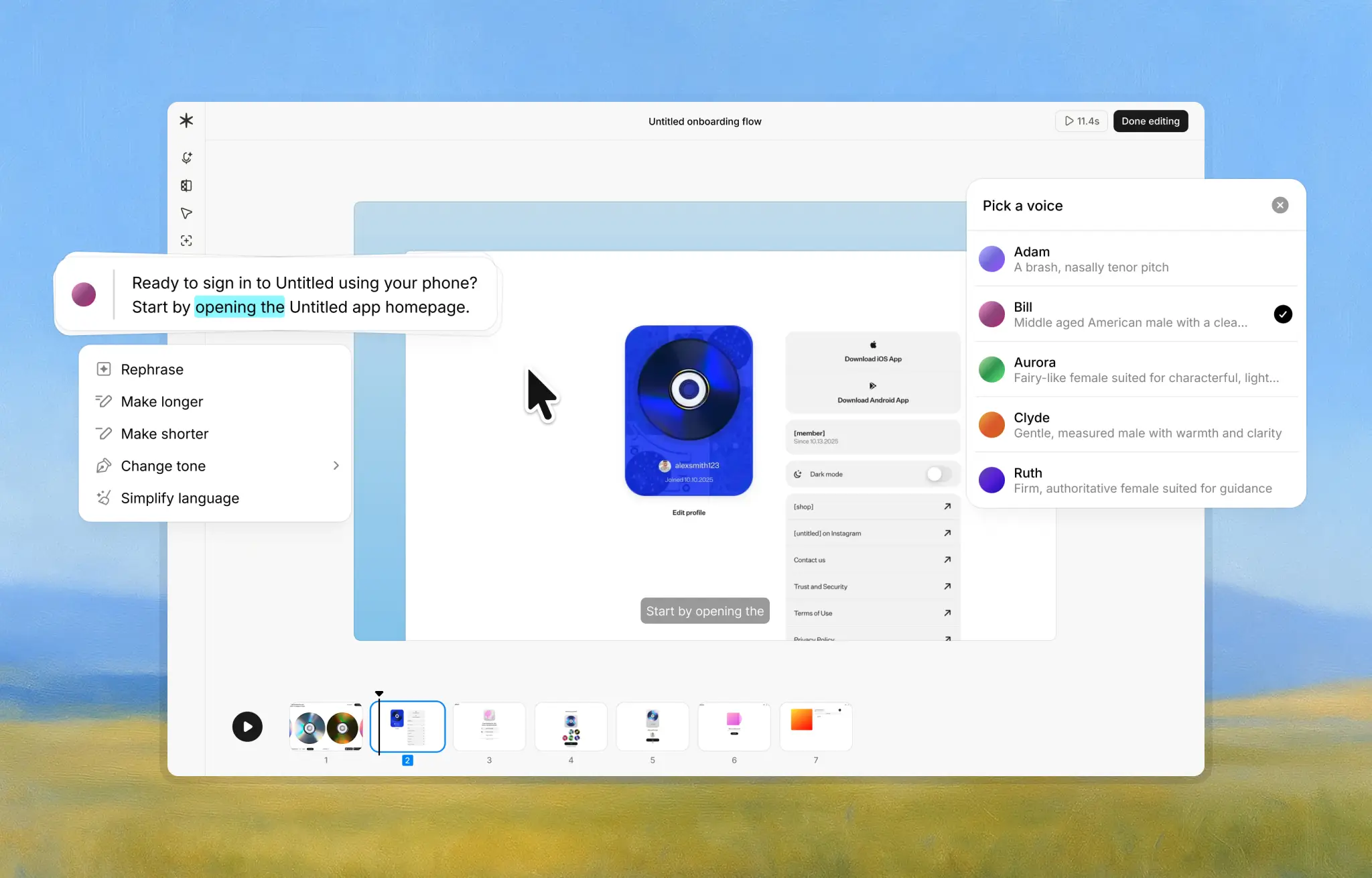
Here’s how it works:
- Record the workflow. Perform the task as you normally would while Guideless captures the software workflow.
- Generate the video guide. Guideless uses AI to turn the recording into an editable video guide with narration and step-by-step guidance.
- Edit and refine. Adjust the steps, narration, visuals, or additional context to match your internal process.
- Share or export. Publish the finished guide using a shareable link or embed, or export it as an MP4, PDF, or Markdown file.
Recording the actual workflow also reduces the need to reconstruct every step from memory, which can make it easier to capture small actions that experienced users might otherwise overlook.
When the software or process changes, you can edit the existing guide instead of rebuilding the documentation from scratch.