
MagicHow is a free Chrome and Edge extension that turns your on-screen actions into step-by-step guides. It captures screenshots as you work through a task, then stitches them into a document you can share as a link, a PDF, or an HTML or Markdown export. For a solo user or a small team writing the occasional SOP, it does the job.
The trouble starts once documentation becomes a bigger part of how your team works. MagicHow stops at screenshots and text. There is no AI-narrated video, no analytics on whether anyone actually finished the guide, and its collaboration and access controls are limited compared to more established platforms. If any of that sounds like what you are missing, the tools below cover a wider range of needs, from lightweight screenshot capture to full AI-narrated video documentation.
Below are 10 MagicHow alternatives worth considering, depending on whether you need screenshot documentation, interactive demos, or AI-narrated video guides.
We compared each tool on four things: how guides are captured, how much AI actually does versus how much editing is left to you, what formats you can share and export, and whether the tool scales to a team.
MagicHow alternatives at a glance
| Tool | Best for | Capture / output | AI-narrated video | Analytics | Free plan |
|---|---|---|---|---|---|
| Guideless | AI-narrated training and onboarding videos | Workflow capture → AI-narrated video guide | Yes | Yes | Yes, limited |
| Scribe | Internal SOPs and quick reference docs | Browser capture → screenshot guide | No | Basic; advanced on paid plans | Yes, limited |
| Tango | Team process documentation | Browser capture → screenshot guide | No | Pro and Enterprise | Yes, limited |
| Guidejar | Interactive demos and public help centers | Browser capture → interactive guide or demo | Yes, paid plans | Paid plans | Yes, limited |
| Guidde | Polished AI video guides at scale | Browser or desktop capture → video + written guide | Yes, paid plans | Business and up | Yes, limited |
| Trupeer | AI video and docs for sales, CS, and training | Screen recording → AI video + written guide | Yes | Paid plans | Yes, limited |
| Loom | Quick async video messaging | Screen recording → video | No | Basic view stats | Yes, limited |
| Supademo | Interactive demos for sales and marketing | Browser or desktop capture → interactive demo | Yes, paid plans | Yes, paid plans | Yes, limited |
| Folge | Lightweight desktop step-by-step guides | Desktop capture → screenshot guide | No | No | Yes |
| Dubble | Free browser-based guide creation | Browser capture → screenshots + video | No | Not published | Yes |
What MagicHow is (and where it falls short)
MagicHow works as a browser extension. You record yourself clicking through a process, and it generates a step-by-step guide with a screenshot for each action. From there you can add titles and descriptions, blur sensitive information, apply basic branding, and export the guide as a PDF, HTML, or Markdown file, or embed it in tools like Notion, Confluence, or Zendesk.
Where it falls short compared to the tools below is video and measurement. There is no way to generate a narrated video guide, and no built-in analytics to show which steps confuse people or where readers drop off. For a straightforward internal SOP, that may not matter. For training or customer-facing content, it's the gap most of the tools on this list are built to close.
Guideless
Guideless is an AI-powered platform that turns software workflows into video training guides. That is easiest when you document the process as you perform it. Instead of a static sequence of screenshots, you capture a workflow once and Guideless generates a structured, AI-narrated video guide with captions and visual highlights, available in 42+ languages. For a wider comparison, see the best process documentation tools in 2026.
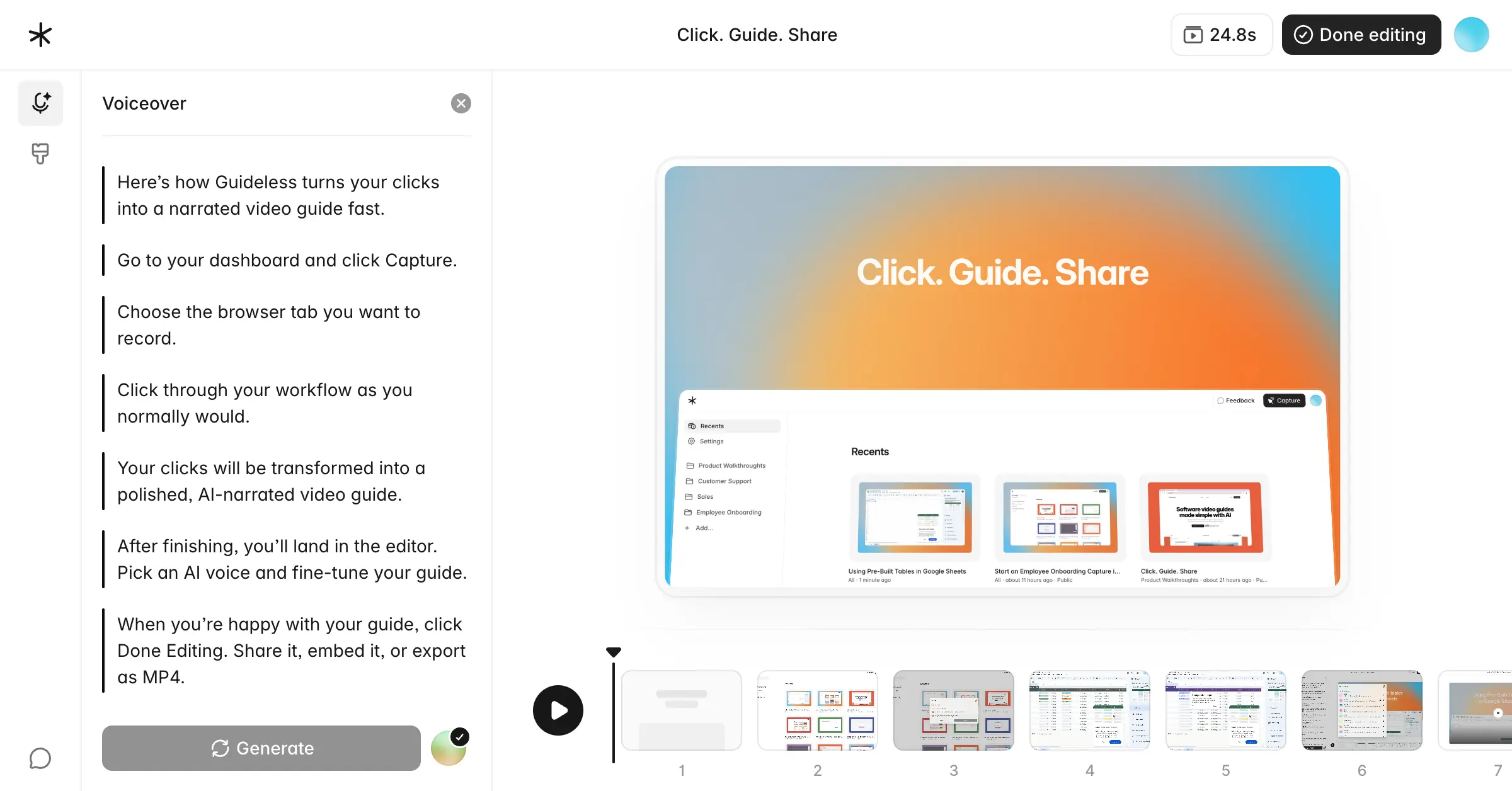
That difference matters most once documentation stops being a reference doc and starts being training material. A screenshot list works for "here are the five clicks to reset a password." It works less well for onboarding a new hire through a multi-step workflow, where a narrated walkthrough carries context that screenshots alone cannot. Guideless also includes analytics on views, completion rates, and where viewers drop off, so you can tell whether a guide is actually working, not just whether it was published.
Guides can be shared as links, embedded in a help center or documentation tool, or exported as MP4 files. For teams that use documentation for onboarding, customer support, or customer success, Guideless can cover both needs in one platform, combining workflow capture, narration, and distribution.
Scribe
Scribe captures your workflow through a browser extension and generates a step-by-step guide with a screenshot and an AI-written description for each click. It's one of the more established tools in this category and works well for teams that mainly need internal SOPs and quick reference documentation.
The free plan captures web apps through the browser and covers a capped number of guides. Desktop and mobile capture, PDF export, custom branding, and redaction of sensitive data sit behind the paid Pro tiers. Video is not part of what Scribe does at any tier, so teams that need narrated walkthroughs for training or customer-facing content usually pair it with a separate video tool.
Tango
Tango turns a recorded workflow into a step-by-step guide automatically, with screenshots, click annotations, and support for embedding guides into Notion, SharePoint, and Confluence. It's aimed at internal process documentation and is easy to pick up without training.
The free plan captures workflows through the browser but caps out at 15 shared workflows across the whole workspace, which fills up fast for an active team. Analytics on who has viewed and completed a guide, along with single sign-on and automatic PII blurring, are paid or Enterprise features. Like Scribe, Tango stays in screenshot-and-text territory rather than generating video or narrated content.
Guidejar
Guidejar combines AI-generated step-by-step guides with interactive product demos, and adds no-code features like click targets and calls to action. It also includes SEO tools aimed at teams that publish guides publicly as part of a help center, which is a feature most tools in this list don't offer. The free plan is capped at 5 guides; paid plans remove that cap and add AI voiceover, help center publishing, and analytics.
It's a good fit if part of your documentation is customer-facing and doubles as product marketing. For purely internal SOPs, the interactive demo and SEO features add complexity you may not need.
Guidde
Guidde captures a workflow through its browser or desktop extension and generates both a written step-by-step guide and a video from the same recording. The free plan covers up to 25 videos, but AI voiceover is a paid feature; on the free plan, narration is your own recorded voice. Paid tiers add unlimited videos, AI voiceover, and branding, with usage analytics reserved for higher tiers.
The practical difference between Guidde and Guideless comes down to workflow and editing control. Guidde gives you a video and a written guide from one capture, with more manual steps if you want AI narration on the free tier. Guideless is built AI-narrated from the start, with viewer analytics included rather than gated to a higher plan. Which one fits better depends on whether you want more hands-on control over the video or a faster path from capture to a finished, narrated guide.
Trupeer
Trupeer records your screen through a Chrome extension and uses AI to turn the recording into both a polished video and a step-by-step written guide, cleaning up filler words and generating a voiceover and captions along the way. It's aimed at teams producing training videos, sales content, and customer education material at volume.
The free plan includes a limited number of AI video minutes and guides, with a watermark on exports. Paid plans add unlimited guide creation, team workspaces, custom branding, and multilingual translation. Trupeer sits closest to Guideless and Guidde in what it produces, so if you're comparing AI video documentation tools, it's worth putting all three side by side for your specific workflow.
Loom
Loom is a screen recording and video messaging tool first, and a documentation tool second. It's excellent for quick async updates, walkthroughs sent to one person, or explaining something faster than typing it out. It's not built to structure a recording into a step-by-step guide with individual, editable steps, which is the core job MagicHow and the other tools on this list are designed for.
The free Starter plan covers a capped number of recordings at a short length limit, with unlimited recordings and more advanced editing on paid tiers. If your main need is formal, structured process documentation, Loom recordings tend to become raw material that still needs to be turned into a guide, rather than being the guide itself.
Supademo
Supademo is an interactive demo builder, closer to a sales and product marketing tool than an internal documentation tool. It's strongest for building clickable product demos for a website, sales deck, or onboarding flow, where the reader interacts with the demo rather than reads a static guide. The free plan covers a small number of demos; paid plans add unlimited demos, AI voiceover, and analytics on viewer engagement.
For internal SOPs or training documentation, Supademo isn't really built for that use case. It's worth including here because it comes up often in the same searches as MagicHow, but the two solve different problems.
Folge
Folge is a desktop app for Mac and Windows that captures each click as you work and generates a guide you can export to HTML, DOC, PDF, and more. It's free to start and fast to use, and closest in spirit to MagicHow, though it runs as a desktop application rather than a browser extension.
Its feature set stops in a similar place to MagicHow's. No video, no AI narration, no analytics. If you're looking for a like-for-like alternative rather than an upgrade, Folge is worth a look.
Dubble
Dubble is a free browser-based tool, available as a Chrome extension, that watches your actions and turns them into a step-by-step guide with screenshots and video. It's a reasonable option if you want to stay in the free tier while getting both screenshots and video from a browser-based capture workflow.
Its feature set is still lighter than the paid platforms on this list, particularly for teams that need analytics and more advanced team management.
How to choose between them
The right pick depends mostly on what the documentation is for and how much you're willing to manage after the recording is done.
- Choose Guideless if the documentation is for training or onboarding, and you want a narrated video guide with analytics without much manual editing after capture.
- Choose Scribe or Tango if you mainly need internal SOPs and quick reference guides, and screenshots with written steps are enough.
- Choose Supademo if the guide is a sales demo or product marketing asset, not internal documentation.
- Choose Loom if you need something fast and informal, like a one-off async update, rather than a structured, reusable guide.
- Choose a lightweight free tool like MagicHow, Dubble, or Folge if your documentation needs are occasional, internal, and don't call for video or analytics yet.
If you're moving off MagicHow because you've outgrown screenshot-only guides, AI-narrated video is a natural next step, and that's where Guideless, Guidde, and Trupeer are worth a closer look.
Ready to move beyond screenshot-only guides?
If you've outgrown screenshot-only documentation, Guideless turns captured software workflows into AI-narrated video guides with built-in analytics. Try Guideless for free and see how it compares to your current documentation workflow.